

JPhone: Trusted Call Records
IHOUSE K.K. · Productivity
Independent analytics for this App Store listing. AppTracker is not affiliated with IHOUSE K.K.
Chart standing · US
What changed · US
Listing changes AppTracker has observed for this app in this storefront — new versions, price moves, rating shifts, and store copy.
• A new app icon and refreshed JPhone branding. • Consistent visuals across the launch screen, in-app marks, incoming calls and Live Activities. Your calling, recording and AI notes features, settings and saved data remain unchanged.
Screenshots


About
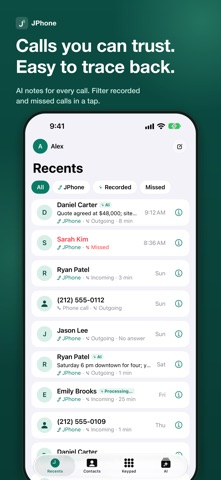
JPhone is an AI call assistant that works like your everyday phone. - YOUR CALLS STAY ON YOUR IPHONE Call history, recordings, transcripts, AI notes and contacts are stored on your iPhone. JPhone's server only connects calls and runs AI analysis temporarily, then deletes it right away (at most 72 hours if not yet received). The server keeps only your account information. - FREE CALLS WITH JUST A PHONE NUMBER Call other JPhone users over the internet by dialing their phone number (data charges may apply). Incoming calls ring on the Lock Screen like a normal phone call. Group calls with up to 3 people. - YOUR CONTACTS ARE NEVER UPLOADED JPhone finds which contacts use JPhone with privately blinded values only. - AUTOMATIC RECORDING YOU CAN STOP ANYTIME Calls between JPhone users are recorded automatically based on each person's settings (on by default). A tone and a Recording indicator show when recording starts, and anyone can stop it at any time or turn it off in Settings. - AI ORGANIZES YOUR CALL After the call, AI writes a call note with a summary, decisions, to-dos, appointments and key numbers. Add items to Calendar or Reminders with one tap, and share notes as PDF. - PRIVATE MESSAGES Send end-to-end encrypted messages to other JPhone users. Our server only relays them encrypted, can't read them, and deletes them once delivered. Calls, AI notes and messages come together in one timeline. - ASK JPHONE Ask "Who did I talk to yesterday?" or "What did we decide?" and get answers from the call history and notes on your iPhone, with links back to the source call. - YOUR DATA IS YOURS Export your data (ZIP), create encrypted backups and restore them, and turn on iCloud sync if you choose (off by default). - IN YOUR LANGUAGE Japanese, Simplified Chinese, Traditional Chinese and English. Each person gets notes in their own language. AI summaries and translations may contain mistakes. Please check the recording and transcript. JPhone does not support emergency calls. In an emergency, use your regular phone app.
What's new · 1.4.2
• A new app icon and refreshed JPhone branding. • Consistent visuals across the launch screen, in-app marks, incoming calls and Live Activities. Your calling, recording and AI notes features, settings and saved data remain unchanged.
Details