

Kapture: Career Stories
NIKHIL SAINI KAPUR · Productivity
Independent analytics for this App Store listing. AppTracker is not affiliated with NIKHIL SAINI KAPUR.
Chart standing · US
What changed · US
Listing changes AppTracker has observed for this app in this storefront — new versions, price moves, rating shifts, and store copy.
Export your data: go to Settings, Your data to save all your Kaptures, people, companies, Kanan chats, and profile as one file. Your story stays put: anything you're typing on the Kapture screen is saved if you switch tabs or leave the app. No more lost edits: swiping away the person or company editor no longer throws out changes you haven't saved. Clearer messages: when something goes wrong, Kapture now tells you what happened in plain words.
Screenshots


About
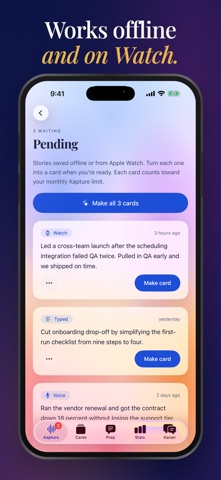
Kapture turns the work you do every day into career stories you can actually use. Kapture a win by voice or text in seconds, and Kapture shapes it into a clear, structured card ready for interviews, performance reviews, and your resume. WHY KAPTURE The best examples of your work fade fast. By the time a review or interview comes around, the details are gone: the numbers, the obstacles, the steps you took. Kapture helps you save those moments while they are fresh, so you always have strong, specific stories to draw from. KAPTURE IN SECONDS Speak or type what happened on iPhone, iPad, Mac, or Apple Watch. Messy details are welcome. Add the company or role, and pick a detail level (Standard, Concise, or Brief) if you like. STRUCTURED CAREER CARDS Every Kapture becomes a card with a clear title, a short summary, the challenge you faced, the actions you took, the outcomes, the skills you showed, and a suggested resume bullet. Your cards live in one library that stays in sync with your kapture.dev account, so a story you Kapture on your phone is waiting for you on your Mac and on the web. PEOPLE Keep notes on the managers, teammates, and mentors you work with, grouped by company, so the context behind your stories is always close at hand. INTERVIEW PREP (PRO) Match your cards to the questions you are likely to hear, shape them into STAR answers, and practice with feedback, so you walk into every interview with examples ready. FLIP THE INTERVIEW (PRO) Switch seats and play the interviewer. Evaluate sample answers or run a full mock interview to learn what a great answer sounds like from the other side of the table. KAP STATS (PRO) Your monthly Key Accomplishments & Performance view shows what you Kaptured this month at a glance, so you can see your progress add up. KANAN, YOUR CAREER COACH (PRO) Chat with Kanan to think through your stories, spot strengths and gaps across your work, and plan what comes next. BUILT FOR REAL LIFE - Offline Kapturing: stories queue on your device and send when you are back online - Already talk to an AI about work? Copy a ready-made prompt into your AI chat to pull out stories you have already shared - Daily reminders nudge you to log a win before you forget it - Widgets and Siri Shortcuts open Kapture in one tap - Apple Watch records on your wrist and sends audio to your iPhone for transcription - A native Mac app with sidebar navigation, keyboard shortcuts, and menu bar commands PLANS Free: 5 Kaptures every month. Pro: unlimited Kaptures, Kanan, KAP Stats, Interview Prep, and 15 Flip sessions every month. Pro+: everything in Pro, plus unlimited Flip sessions and early access to new features. Pro and Pro+ are auto-renewing subscriptions, billed monthly or yearly. Payment is charged to your Apple Account. Subscriptions renew automatically unless canceled at least 24 hours before the end of the current period, and you can manage or cancel them in your App Store account settings. PRIVACY FIRST No ads and no tracking. Speech is transcribed on your device, and only the text you choose to send is used to generate cards. You can delete your account and its data at any time. ONE ACCOUNT EVERYWHERE Sign in with Apple, Google, or email, using the same account as kapture.dev. Terms of Use: https://kapture.dev/terms Privacy Policy: https://kapture.dev/privacy
What's new · 1.0.1
Export your data: go to Settings, Your data to save all your Kaptures, people, companies, Kanan chats, and profile as one file. Your story stays put: anything you're typing on the Kapture screen is saved if you switch tabs or leave the app. No more lost edits: swiping away the person or company editor no longer throws out changes you haven't saved. Clearer messages: when something goes wrong, Kapture now tells you what happened in plain words.
Details