

CaptureVault
Marcus Neves · Productivity
Independent analytics for this App Store listing. AppTracker is not affiliated with Marcus Neves.
Chart standing · US
What changed · US
Listing changes AppTracker has observed for this app in this storefront — new versions, price moves, rating shifts, and store copy.
Large collections open without freezing: their screenshots appear as they load. Collections now show a thumbnail of each screenshot, and you can touch and hold a screenshot in the library to mark it as a favorite or add it to a collection without opening it. Indexing a large library is faster, and it no longer needs the app kept open: a Live Activity shows when CaptureVault is indexing, and Continue in Background asks iOS to keep going after you leave. iOS decides how long it runs. If indexing stops while you are editing something, it continues as soon as the edit is saved. Search stays responsive on large libraries, and multi-word searches finish sooner. Also: Privacy → About shows the installed version, the Privacy Notice links to the website and the privacy policy, event dates no longer follow the screenshot's status-bar clock, archived cards keep readable text, and privacy settings tell you when a change could not be saved.
Screenshots


About
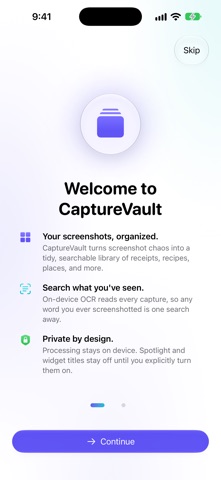
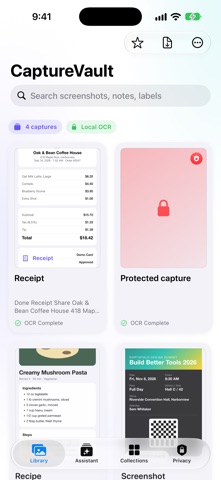
CaptureVault turns the pile of screenshots on your iPhone into a searchable archive, with no account, no server and nothing leaving your device unless you ask it to. You screenshot receipts, bookings, addresses, recipes, codes and chats, and then you can't find them. CaptureVault imports only the images Photos marks as screenshots, reads the text in each one on the device, and makes all of it searchable. FIND IT BY WHAT IT SAYS • Text recognition (OCR) with Apple's Vision, on the device • Search the text inside images, and exclude words with a minus sign (coffee -market) • Titles, kinds and suggestions generated by local rules ORGANIZE WITHOUT EFFORT • Manual and automatic collections, favorites, pins and notes • Collections show a thumbnail of each screenshot; favorite or file a screenshot straight from the library • Related captures, with expired ones flagged • An on-device assistant that answers from your captures and cites its sources PRIVACY FOR REAL • All processing happens on your iPhone or iPad: the app does not connect to any server • No account, no ads, no analytics and no third-party SDKs • Looks on the device for passwords, API keys, bank details and documents in screenshots; when it finds them, it hides their thumbnails, keeps them out of system search, Siri, the widget and the assistant, and leaves their text out of exports • Database excluded from device backups • Delete one capture or all app data at any time; the original photo leaves Photos only when you confirm BUILT INTO iOS • Ask Siri to search CaptureVault: the results open in the app's own search • Spotlight, Siri with Apple Intelligence, Shortcuts and Visual Intelligence show your captures only if you turn them on • Widget with optional previews • Background indexing that respects battery and Low Power Mode • A Live Activity while a large library is indexed, and Continue in Background to ask iOS to keep indexing after you leave the app • JSON export of your data ON-DEVICE AI With Apple Intelligence turned on, the assistant and smart search use Apple's Foundation Models on the device. Without it, or in Manual Only mode, CaptureVault keeps working with local rules. Requires Photos access (limited access works too). Assistant answers and smart search use Apple Intelligence when available; without it, the assistant shows ranked results and search uses local rules. Import, OCR, search and collections work on any device running iOS 27. One-time purchase, no subscription. In English and Portuguese. Requires iOS 27 or iPadOS 27.
What's new · 1.2.1
Large collections open without freezing: their screenshots appear as they load. Collections now show a thumbnail of each screenshot, and you can touch and hold a screenshot in the library to mark it as a favorite or add it to a collection without opening it. Indexing a large library is faster, and it no longer needs the app kept open: a Live Activity shows when CaptureVault is indexing, and Continue in Background asks iOS to keep going after you leave. iOS decides how long it runs. If indexing stops while you are editing something, it continues as soon as the edit is saved. Search stays responsive on large libraries, and multi-word searches finish sooner. Also: Privacy → About shows the installed version, the Privacy Notice links to the website and the privacy policy, event dates no longer follow the screenshot's status-bar clock, archived cards keep readable text, and privacy settings tell you when a change could not be saved.
Details