

ClipIndex: Transcribe & Search
seiya kawano · Productivity
Independent analytics for this App Store listing. AppTracker is not affiliated with seiya kawano.
Chart standing · US
What changed · US
Listing changes AppTracker has observed for this app in this storefront — new versions, price moves, rating shifts, and store copy.
Minor improvements and stability fixes.
Screenshots



About
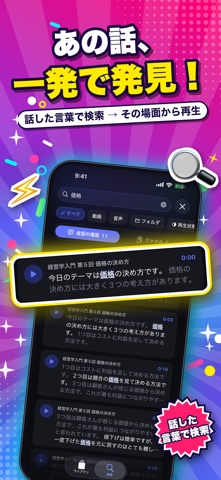
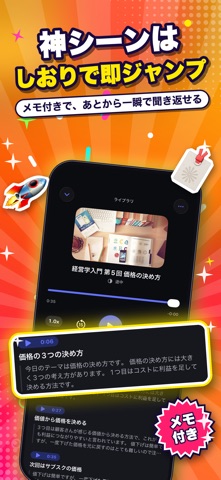
“Where did they say that?” ClipIndex is a media library you can search by the words that were spoken. It transcribes your saved videos and recordings right on your device, so you can search not only file names but what was actually said. Tap a result and playback starts from the moment those words were spoken. Going back through lectures, meeting recordings, seminars, interviews, and podcasts becomes much easier. ■ Search by what was said • Search file names and speech together • Switch between “Moments” and “Files” • Play right from the moment you find • See frequent words at a glance ■ On-device transcription • Transcription happens entirely on your iPhone. No internet connection, nothing sent anywhere • Long files are processed bit by bit and resume where they left off if interrupted • Transcribe all untranscribed files at once • Check progress and order in one list ■ Summaries • After transcription, an overview, key points, and chapter summaries are created automatically • Tap a chapter to play from there * Summaries are available on devices that support Apple Intelligence ■ A player made for listening • Read the transcript as you listen, and tap any line to play from it • 0.5x to 3.0x playback speed, skip forward and back • Background playback, Lock Screen controls, Picture in Picture • Bookmark the moments that matter ■ Organize and save space • Folders, plus automatic grouping by file name • Card view for videos, list view for audio • Duplicate file detection • Compress video and audio (check playback before deleting the original) ■ Put the content to work • Share selected lines or the text around a bookmark with apps such as ChatGPT • Sharing always happens by your own action; nothing is sent automatically ■ Import • From the Files app, your photo library, the share sheet, or a file URL ■ Privacy • Media, transcripts, summaries, and playback history are stored on your device • Lock the app with Face ID ■ Pricing Every feature is free to use. The first 3 days after installing are ad-free. After that, a full-screen ad may appear before playback starts (only when at least 30 minutes have passed since the last ad). ClipIndex Pro removes the ads. • Monthly plan • Yearly plan • Lifetime purchase (pay once, ad-free forever) ■ About auto-renewing subscriptions • Monthly and yearly plans renew automatically unless auto-renew is turned off at least 24 hours before the end of the current period • Your account is charged for renewal within 24 hours before the end of the current period • Payment is charged to your Apple Account at confirmation of purchase • You can manage and cancel subscriptions in the Settings app under Apple Account > Subscriptions after purchase Privacy Policy: https://fillapps.com/privacy/ Terms of Use (EULA): https://www.apple.com/legal/internet-services/itunes/dev/stdeula/
What's new · 1.2.2
Minor improvements and stability fixes.
Details