

Bouclier – Ad Blocker
Daniel Madac · Utilities
Independent analytics for this App Store listing. AppTracker is not affiliated with Daniel Madac.
Chart standing · US
What changed · US
Listing changes AppTracker has observed for this app in this storefront — new versions, price moves, rating shifts, and store copy.
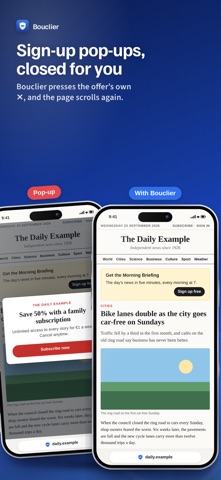
Sign-up and subscription pop-ups, closed for you. When a site covers the page with a “Subscribe”, “Sign up” or newsletter offer, Bouclier presses the offer’s own close button and lets the page scroll again. It never touches a paywall, a sign-in form or a pop-up you opened. It is on from the start; turn it off in Bouclier’s menu (Sign-up pop-ups) or in the settings.
Screenshots





Similar apps
Competitors and close alternatives, as estimated by AppTracker.
 Ad Blocker - For Safari
Shubham Sharma
Ad Blocker - For Safari
Shubham Sharma
 Ad Blocker & Filters
Orange Media CO.,Ltd
Ad Blocker & Filters
Orange Media CO.,Ltd
 Ad Blocker Pro: Safari & DNS
CloudEx Inc.
Ad Blocker Pro: Safari & DNS
CloudEx Inc.
 Stop Ads - The Ultimate Ad-Blocker for Safari
Denys Ievenko
Stop Ads - The Ultimate Ad-Blocker for Safari
Denys Ievenko
 Ad blocker - Remove ads
Shenzhen Ziyun Technology Co.,Ltd
Ad blocker - Remove ads
Shenzhen Ziyun Technology Co.,Ltd
 AdGuard Ad Blocker for Safari
Adguard Software Limited
AdGuard Ad Blocker for Safari
Adguard Software Limited
 Ads Blocker Privacy Protector
嘉琪 曾
Ads Blocker Privacy Protector
嘉琪 曾
 AdBlock Pro for Safari
Crypto Inc.
AdBlock Pro for Safari
Crypto Inc.
About
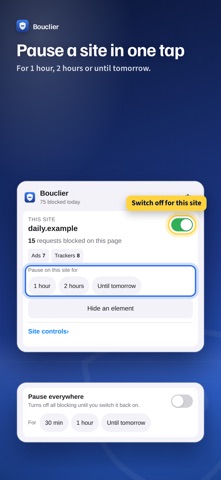
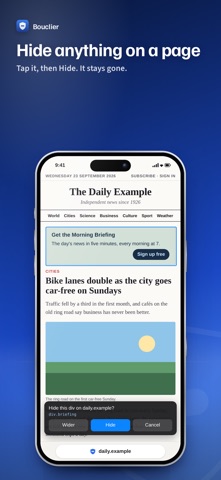
Bouclier is an ad blocker for Safari on Mac, iPhone and iPad. This Safari extension stops ads, trackers and malware sites before they load, so pages open faster, use less data and stop following you around. WHAT IT BLOCKS • Ads and ad networks, and the empty spaces they leave behind • Trackers and analytics scripts • Pop-up ads that open new tabs • Malware and phishing sites • "Turn off your ad blocker" walls • Video ads • Optional: cookie banners, social buttons and newsletter pop-ups CLEAN LINKS Tracking tags such as utm_source, fbclid and gclid are removed from links before the page loads. YOU STAY IN CHARGE • See what was blocked on each page • Turn Bouclier off for one site, or pause it for 1 hour, 2 hours or until tomorrow • Page broken? Allow one blocked address on that site only • Hide anything on a page, and bring it back later • Per-site controls: block web fonts, scripts from other sites or comments • Your own filters, in the Adblock Plus format • Statistics: today, this week and all time • On Mac: right-click menu and keyboard shortcuts PRIVATE BY DESIGN Bouclier uses Safari's built-in blocking engine: Safari applies the rules itself, so Bouclier never sees the pages you visit. There is no account, no tracking and no data collection. Statistics stay on your device. HOW TO TURN IT ON Mac: Safari → Settings → Extensions → Bouclier. iPhone and iPad: Settings → Apps → Safari → Extensions → Bouclier. Allow it on all websites so it can also hide empty ad spaces, close pop-up ads and remove video ads. One purchase covers Mac, iPhone and iPad. Bouclier is in English and French, following the device's language. Filter lists: EasyList, EasyPrivacy, Liste FR and the Adblock Warning Removal List by the EasyList authors (CC BY-SA 3.0), the EasyList Cookie List (CC BY 3.0) and the Online Malicious URL Blocklist (CC0). Each app update brings fresh lists.
What's new · 1.3.1
Sign-up and subscription pop-ups, closed for you. When a site covers the page with a “Subscribe”, “Sign up” or newsletter offer, Bouclier presses the offer’s own close button and lets the page scroll again. It never touches a paywall, a sign-in form or a pop-up you opened. It is on from the start; turn it off in Bouclier’s menu (Sign-up pop-ups) or in the settings.
Details