

Practice Log n Share
Takafumi Horiuchi · Productivity
Independent analytics for this App Store listing. AppTracker is not affiliated with Takafumi Horiuchi.
Chart standing · US
Screenshots


About
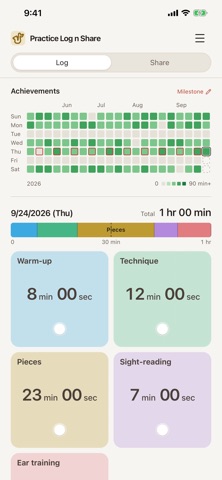
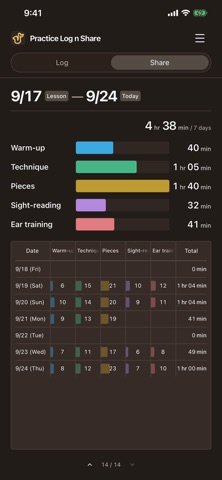
Make your practice visible. "Practice Log n Share" records the time you spend practicing and helps you show your effort to a teacher or someone supporting your progress. Use it for music or another skill. • Tap Start Logging, then a category card to time it. Switch cards when you change activities. • Pause, resume, and add or correct logs later. • See your consistency in an Achievements heat-map that spans your recorded years. • Add the Home Screen widget to see today’s practice by category and your Achievements at a glance. While you log, the time also appears on the Lock Screen and in the Dynamic Island (iPhone). • Mark lesson days and other milestones to organize your logs into useful periods. • Show category totals and daily records in the "Share" view at your next lesson. • Choose a theme icon, which your Home Screen icon follows, and make the categories your own. • Choose a light or dark appearance, and adjust date, time and week-start formats. • Export a JSON backup and review its contents before restoring it. Share is a view for showing your records. It does not automatically send them to a teacher, post to social media or provide shared editing. The app does not record audio or analyze your practice content. No account is required. Your practice log is stored on your device and is not sent to a developer-operated server. Log practice on 5 distinct dates for free. The dates do not need to be consecutive, and there is no expiry. Multiple logs on the same date count as one day; deleting logs does not restore the free allowance. Logging on a sixth or later new date requires a one-time unlock at the price shown in the app. You can still add logs to dates covered by your free allowance. This is not a subscription, and there is no automatic charge. Viewing, editing, deleting, sharing, exporting and restoring existing records remain free. You can restore a previous purchase from the menu. The app interface and support are available in English and Japanese.
What's new · 1.0.1
• Reorder now has Discard, next to Done. It puts back the cards you moved and any you hid since Reorder began. If you hid the card you were logging, logging simply continues. • When the last row of cards has an empty space, touch and hold it to start reordering your categories. • A card you lift to move now looks exactly like the card itself. • Achievements now opens fully at its right edge, so today’s square is no longer slightly cut off.
Details