

Lunaqlo - Moon Phase Clock
Hajime Nakamura · Lifestyle
Independent analytics for this App Store listing. AppTracker is not affiliated with Hajime Nakamura.
Chart standing · US
What changed · US
Listing changes AppTracker has observed for this app in this storefront — new versions, price moves, rating shifts, and store copy.
Put the moon where you like. • Pinch to resize it, drag to move it. Where you leave it is where it stays. • Leave it alone and the layout drifts on its own, slowly. Turn it off in Settings. • Zoom in and the craters hold up — they are computed from NASA's lunar relief, not drawn on. • The time is white now, and a size larger by default. It was too faint to read with the lights on. • The time scales with the moon, so the two always belong together. • One purchase also unlocks four sizes for the time.
Screenshots




About
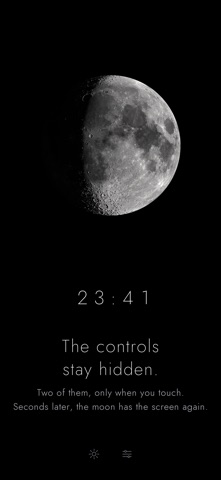
Lunaqlo shows the moon as it is right now, and the time. Nothing else. The moon is not a photograph. It is drawn each time from a single set of NASA lunar data — the LROC albedo mosaic and LOLA topography — mapped onto a sphere and lit from wherever the sun actually is at that moment. Craters catch the light along the terminator. The phase changes continuously, because the light does, not because an image was swapped. There is no date, no notifications, no interface. Tap once and two controls fade in; leave it alone and they fade out again. Set it on a shelf and it keeps the sky. Free • The moon, rendered in real time • The time, in a thin quiet face • Stays on, with burn-in protection • Brightness, without touching your system setting • Pinch and drag to place the moon where you like • Layouts that drift on their own, slowly, over time One purchase unlocks • Three moon finishes — Sharp, Soft, Warm • Five typefaces for the clock • Hide the clock entirely, or nudge it up and down • Four sizes for the time Not a subscription. No further purchases. No ads. No location data is used and nothing that identifies you is collected. Usage reporting can be turned off in settings. Lunar imagery: NASA/GSFC Scientific Visualization Studio (public domain).
What's new · 1.2
Put the moon where you like. • Pinch to resize it, drag to move it. Where you leave it is where it stays. • Leave it alone and the layout drifts on its own, slowly. Turn it off in Settings. • Zoom in and the craters hold up — they are computed from NASA's lunar relief, not drawn on. • The time is white now, and a size larger by default. It was too faint to read with the lights on. • The time scales with the moon, so the two always belong together. • One purchase also unlocks four sizes for the time.
Details