

Coachplane: Soccer Tactics
EMPRISE FUN LLC · Sports
Independent analytics for this App Store listing. AppTracker is not affiliated with EMPRISE FUN LLC.
Chart standing · US
Screenshots


About
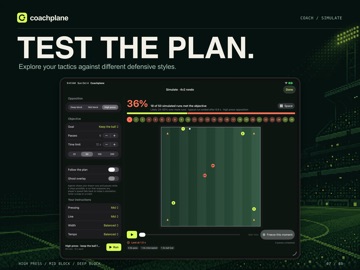
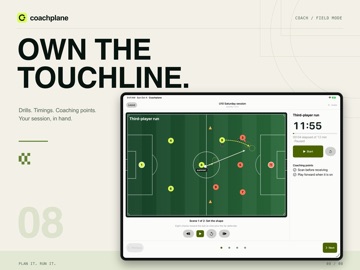
Coachplane brings soccer planning and playable matches together on iPad. Choose Coach to create animated plans and training sessions, or Player to jump into Kickoff. PLAY RIGHT AWAY • Open Player and tap Play now to start a Kickoff match without signing in. • Play solo or choose Two players to share the same iPad. Check How to play and adjust Match options before kickoff. • Hold Sprint to chase the ball or break into space. Choose penalties to settle tied standalone matches. • Switch between Coach and Player whenever you need. Coachplane remembers your choice on this device. START LOCAL • Open a bundled sample or create your own plan or session in Coach. • Your drafts stay on this iPad between visits. Sign in when you want to save a draft to your cloud workspace—you choose what to save. DRAW IT, THEN WATCH IT MOVE • Put players, cones, goals, and the ball on a pitch, then add scenes. Animate runs, passes, and rotations between the positions you draw. • Start with formations for 5v5, 7v7, 9v9, and 11v11, half-pitch attacks, rondos, and small-sided games. • Mark up scenes with Apple Pencil and use selection tools to adjust your board. • Work in landscape or portrait with layouts that adapt to your iPad window. PLAN THE WHOLE SESSION • Combine drills and breaks with timings, objectives, and coaching points. • Run a session from the touchline in Field Mode, one activity at a time, with a timer and saved progress. EXPLORE IT THROUGH PLAY • Simulate a plan against a high press, a mid block, or a deep block. • Play eligible drills as levels, or start a small-sided match with touch controls. • Follow the score, objective, and match time on the scoreboard. Tap it to pause, then resume or exit from the pause menu. • Choose an Arcade, stadium, or top-down look for Play. YOUR CLUB, IN SYNC • Sign in to save plans, drills, and sessions to your cloud workspace and open them on the web. • Share a workspace with assistant coaches and switch between clubs. PRIVATE BY DESIGN • No ads and no tracking. • Creating plans and sessions, bundled samples, Play, and Simulate work without an account. Cloud saving and club sharing require sign-in. • Player references stay focused on what a tactics board needs: a position or a first name. Questions or ideas: support@anyplane.io
Details