

CarDSPMusic
Yoichiro Taki · Music
Independent analytics for this App Store listing. AppTracker is not affiliated with Yoichiro Taki.
Chart standing · US
What changed · US
Listing changes AppTracker has observed for this app in this storefront — new versions, price moves, rating shifts, and store copy.
- Hi-res audio now plays at its native resolution (up to 384kHz with a USB DAC), with optional automatic upsampling and an on-screen format display. - In-car correction can now be fine-tuned in 0.1dB steps. - Tap frequency labels to select multiple bands and raise or lower them together. - Fixed an issue where playback went silent while still showing as playing after an interruption (such as a timer) or a Bluetooth output change. - Fixed an issue where a USB DAC connected while the app was running was not used until the app was restarted. - Minor improvements.
In-app purchases · US
No in-app purchases.
Screenshots


Similar apps
Competitors and close alternatives, as estimated by AppTracker.
 Cloud Music Player - Listener
继勋 于
Cloud Music Player - Listener
继勋 于
 Basic Music Player
dotori king
Basic Music Player
dotori king
 BTR AMP Advanced Music Player
Beyond The Rapids Laboratories LLC
BTR AMP Advanced Music Player
Beyond The Rapids Laboratories LLC
 Equalizer
Audioforge Labs Inc.
Equalizer
Audioforge Labs Inc.
 Bluetooth Car Audio Music Play
Albert Parti
Bluetooth Car Audio Music Play
Albert Parti
 Flacbox: Hi-Res Music Player
EVERAPPZ SL
Flacbox: Hi-Res Music Player
EVERAPPZ SL
 DashMode
RezPoint Inc.
DashMode
RezPoint Inc.
 Hi-Res music player-NePLAYER
radius co., ltd.
Hi-Res music player-NePLAYER
radius co., ltd.
About
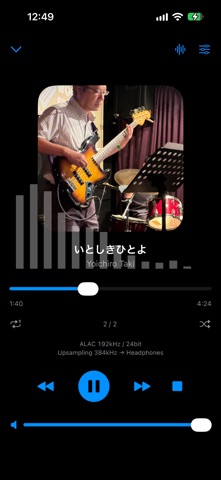
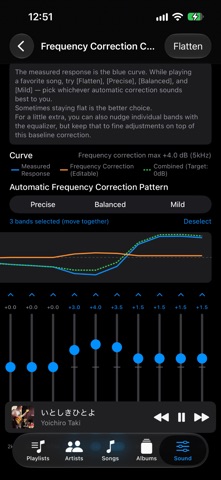
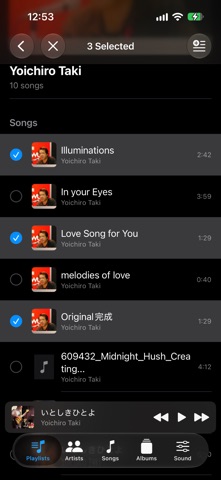
A simple music player that plays songs from your iPhone's Music library, browsable by playlist, artist, song, or album. Perfect for listening during your commute or at home — and the moment you get in the car, it transforms into a true car audio experience. ■ 28-Band Equalizer & Tone Control Fine-tune your sound with a 28-band graphic equalizer powered by digital signal processing (DSP). A dedicated "Tone Control" screen, accessible right from the full-screen player, lets you quickly adjust just bass and treble — intuitive enough to use even while driving. Genre presets (Jazz, Vocal, and more) are also included. ■ Automatic Cabin Acoustic Correction Using your device's microphone, the app records a sweep tone measurement and analyzes the acoustic characteristics unique to your car's cabin (peaks and dips caused by reflection and resonance) to automatically generate a correction curve. Choose how strongly the correction is applied from several patterns, or fine-tune it manually afterward, just like an equalizer. You can preview and adjust the correction curve anytime, without interrupting your music. ■ Multi-Layer Clipping Protection A combination of input pre-attenuation, dynamic gain management, and an output limiter detects and suppresses clipping during loud playback, keeping your sound clean. ■ Hi-res output via USB DAC With a USB DAC connected, choose how to play in the Sound tab's "Output rate": - Native: outputs hi-res tracks at their original sample rate (no rate conversion in the app) - Auto upsampling: upsamples by whole-number ratios up to 384kHz (352.8kHz for the 44.1kHz family) The full-screen player shows the track format and the actual output rate at a glance. * Available rates depend on your DAC. ■ Other Features • Create playlists of your favorite songs • Spectrum display on the full-screen player • Playback control from the lock screen and Control Center, with background playback support • Supports Bluetooth and USB DAC connections • Japanese and English interface support ■ Supported Files The app plays songs already added to your iPhone's Music app (AAC, MP3, Apple Lossless, WAV, AIFF, FLAC, and more). Songs protected by DRM, including Apple Music tracks (even downloaded ones), cannot be played. Please add and sync the songs you want to play to your Music library beforehand. On your commute, at home, or in the car — enjoy your favorite songs, tuned exactly the way you like, wherever you are.
What's new · 1.0.4
- Hi-res audio now plays at its native resolution (up to 384kHz with a USB DAC), with optional automatic upsampling and an on-screen format display. - In-car correction can now be fine-tuned in 0.1dB steps. - Tap frequency labels to select multiple bands and raise or lower them together. - Fixed an issue where playback went silent while still showing as playing after an interruption (such as a timer) or a Bluetooth output change. - Fixed an issue where a USB DAC connected while the app was running was not used until the app was restarted. - Minor improvements.
Details