

旅プラン、並べ替えるだけで旅程を自動計算
Kazuaki Takahashi · Travel
Independent analytics for this App Store listing. AppTracker is not affiliated with Kazuaki Takahashi.
Chart standing · US
What changed · US
Listing changes AppTracker has observed for this app in this storefront — new versions, price moves, rating shifts, and store copy.
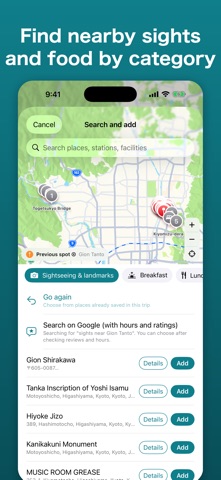
What's new in 1.3.4 • Adding a stop now uses one screen. Open it from "+ Add a stop", or swipe right / long-press a stop for "Add after this" • The add screen opens with the meal type for that time (breakfast, lunch, snacks & cafés, dinner) selected, so nearby places appear right away • Sightseeing results now focus on real highlights, with popular-spot buttons for each destination • "Details" on a result opens Google reviews and opening hours directly • New "Home & nearest station" in Settings, used as the default for new trips • Trip creation shows steps (1/3–3/3) and a summary before creating • Place names not in the list can be picked from map-verified candidates (municipalities, stations, etc.) • AI suggestions are about twice as fast • New "Appearance" in Settings: Use device setting, Light, or Dark • New "Share the app" in Settings to recommend TabiPlan by message or email Thank you for using TabiPlan.
Screenshots




About
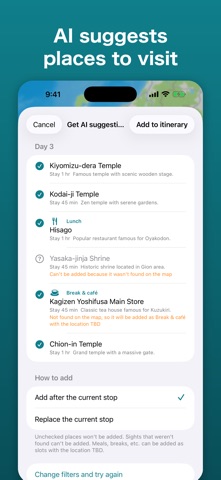
TabiPlan is a trip planner for Japan. Just line up the places you want to visit, and it calculates travel times and arrival times for you. Change the order or how long you stay, and the whole itinerary is recalculated on the spot. ■ Build an itinerary just by reordering ・Travel times by train, car, walking and plane are calculated automatically, from your starting point to each stop ・Train times follow the timetable. Legs that may miss the last train are flagged ・Drag stops to reorder them and arrival times update instantly ・Set the time you want to arrive, and the departure time is worked out for you ・See each day and the whole trip at a glance, however many days you travel ■ Always with a map ・Your itinerary is always shown with a map, so you can see where each stop is and in what order ・Find nearby sights and places to eat by category (sightseeing, lunch, café, souvenirs and more) and add them ・For train legs, tap "View transit" to check routes in your transit app ■ AI suggests where to go ・Choose a destination, number of days, pace and interests, and AI drafts a list of stops ・Only places confirmed on the map are added to your itinerary ・Days that run too late or go back and forth can be rearranged by AI ・Place names are shown in your language ■ Accommodation, too ・Search for available rooms and prices near your last stop of the day (Rakuten Travel) ・Already booked? Just enter the name. Things like "drop off luggage" before check-in are shown automatically ■ Share and sync ・Send your itinerary to travel companions as a file, as text, or as a travel booklet (PDF) ・Sign in with Apple to sync your trips between iPhone and iPad (free) ・Invite companions to view and edit the same itinerary together (TabiPlan Pro). Travel times are calculated from each person's own starting point ■ Handy on the day ・Day-of mode shows your next stop and the time left at your current stop on the Lock Screen (iPhone) ■ Languages ・English, Traditional Chinese, Simplified Chinese, Korean and Japanese. Switch in Settings ■ TabiPlan Pro (auto-renewing monthly or yearly subscription) ・Invite companions and edit together ・Use AI suggestions more times a day ・Building itineraries, maps, travel time calculation, sharing by file, text or booklet, and syncing your own devices are free ・Payment is charged to your Apple ID when you confirm the purchase. The subscription renews automatically for the same period unless auto-renew is turned off at least 24 hours before the end of the current period. You can cancel or manage auto-renewal in your App Store account settings Terms of Use: https://kazutaka.biz/kiyaku/ Privacy Policy: https://kazutaka.biz/privacy/ * Travel times are estimates from the map service. Please check actual service status and timetables with each transport operator.
What's new · 1.3.4
What's new in 1.3.4 • Adding a stop now uses one screen. Open it from "+ Add a stop", or swipe right / long-press a stop for "Add after this" • The add screen opens with the meal type for that time (breakfast, lunch, snacks & cafés, dinner) selected, so nearby places appear right away • Sightseeing results now focus on real highlights, with popular-spot buttons for each destination • "Details" on a result opens Google reviews and opening hours directly • New "Home & nearest station" in Settings, used as the default for new trips • Trip creation shows steps (1/3–3/3) and a summary before creating • Place names not in the list can be picked from map-verified candidates (municipalities, stations, etc.) • AI suggestions are about twice as fast • New "Appearance" in Settings: Use device setting, Light, or Dark • New "Share the app" in Settings to recommend TabiPlan by message or email Thank you for using TabiPlan.
Details