

Crop&Scale
Ilia Bogdanovski · Photo & Video
Independent analytics for this App Store listing. AppTracker is not affiliated with Ilia Bogdanovski.
Chart standing · US
What changed · US
Listing changes AppTracker has observed for this app in this storefront — new versions, price moves, rating shifts, and store copy.
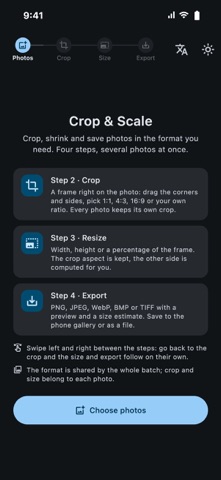
Crop & Scale 1.0 – a new step-by-step design. • Four clear steps – Photos, Crop, Size, Export – that you swipe through. Go back to any step and the later ones update instantly. • Save straight to your photo library, or export as files as before. • Custom size: type the exact pixel dimensions you need, and the crop frame locks to that ratio. • Made for iPad and iPhone Duo: on wide screens the photo and the controls sit side by side. • Your photos are shown as a grid of cards. • Start over after an export to begin a new batch in one tap. • Fixed a crash when entering sizes for large photos and reduced memory use with big HEIC images. • The number keyboard now closes when you tap outside it.
Screenshots


About
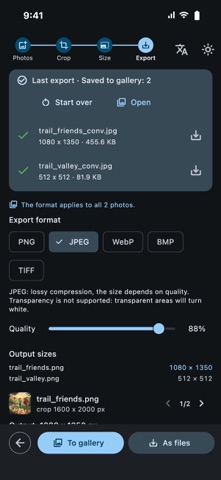
Crop&Scale is a simple tool for preparing images: open photos, crop each one right on the screen, pick a size and format, and save the whole batch at once. CROP ON THE PHOTO • Drag the frame, resize it by the corners and sides • Presets: free, 1:1, 4:3, 3:4, 16:9, 9:16 • Custom ratio from your own numbers, e.g. 244×377 • Every photo keeps its own crop and aspect ratio RESIZE • Set width or height in pixels, the other side follows the crop proportions • Or scale by percent with a slider • Output size in pixels is shown before saving CONVERT • PNG (lossless), JPEG, WebP, BMP, TIFF • Quality slider for JPEG and WebP with a live preview and an estimated file size • BMP 24 / 8 / 4 / 1 bit with optional dithering, and a compact header for e-ink displays • Opens HEIC, JPEG, PNG, WebP, GIF, BMP, TIFF BATCH EXPORT • Several images are processed in parallel in the background, the interface stays responsive • Save one photo with the system dialog, or a whole batch into a folder you choose • Existing files are never overwritten PRIVACY • Everything happens on your device, nothing is uploaded • Location and other EXIF metadata are stripped from saved files • No ads, no accounts, no tracking Light and dark themes, English and Russian interface.
What's new · 1.0.0
Crop & Scale 1.0 – a new step-by-step design. • Four clear steps – Photos, Crop, Size, Export – that you swipe through. Go back to any step and the later ones update instantly. • Save straight to your photo library, or export as files as before. • Custom size: type the exact pixel dimensions you need, and the crop frame locks to that ratio. • Made for iPad and iPhone Duo: on wide screens the photo and the controls sit side by side. • Your photos are shown as a grid of cards. • Start over after an export to begin a new batch in one tap. • Fixed a crash when entering sizes for large photos and reduced memory use with big HEIC images. • The number keyboard now closes when you tap outside it.
Details