

ScanPro - Scan & Edit PDF
Veghes Lucian · Productivity
Independent analytics for this App Store listing. AppTracker is not affiliated with Veghes Lucian.
Chart standing · US
What changed · US
Listing changes AppTracker has observed for this app in this storefront — new versions, price moves, rating shifts, and store copy.
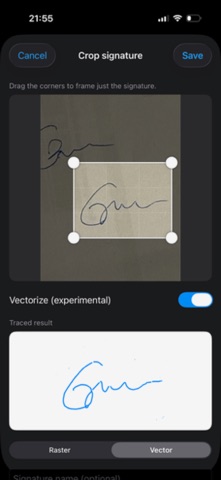
Sign any PDF in seconds — this update puts signatures front and center. NEW • Sign by drawing, scanning or importing a signature. • Vectorized signatures: your signature is traced into clean, editable strokes (experimental) — not a flat, low-quality stamp. • Place a signature anywhere, then resize, rotate and recolor it to match the document. • Save a signature once and reuse it on any document. ALSO IN THIS UPDATE • Extract text from a scan (OCR) into a new, fully editable text document. • Correct the recognized text right on the page. • Redaction eraser with adjustable size — now white by default. • New text defaults to black at a readable size. • Fresh app icon. Improvements and fixes • Faster, more reliable export and sharing of text documents. • Pinch to zoom while editing a text document. • Fixed signature direction/resize on rotated pages. • Various polish and stability fixes. Thanks for using ScanPro — happy signing!
In-app purchases · US
What this app sells inside itself, grouped by kind and priced for this storefront.
Screenshots




About
ScanPro turns your iPhone into a fast, simple PDF scanner and editor. Scan a document, sign it, stamp it and print or share it, all in one app. SCAN WITH YOUR CAMERA - Scan documents, receipts, invoices, contracts and notes - Crop and clean up every page - Save your scans as PDF files EDIT YOUR PDFs - Edit PDF documents right on your phone - Add your signature in seconds - Place a stamp on any document PRINT AND SHARE - Send documents straight to your printer - Share by email or message, or save to Files WHY SCANPRO - Simple, clean interface, no learning curve - Works with the documents you already have, not just new scans - Free to download Whether it's a signed contract, a receipt for expenses or a form that needs your stamp, ScanPro gets it done in a few taps.
What's new · 1.1
Sign any PDF in seconds — this update puts signatures front and center. NEW • Sign by drawing, scanning or importing a signature. • Vectorized signatures: your signature is traced into clean, editable strokes (experimental) — not a flat, low-quality stamp. • Place a signature anywhere, then resize, rotate and recolor it to match the document. • Save a signature once and reuse it on any document. ALSO IN THIS UPDATE • Extract text from a scan (OCR) into a new, fully editable text document. • Correct the recognized text right on the page. • Redaction eraser with adjustable size — now white by default. • New text defaults to black at a readable size. • Fresh app icon. Improvements and fixes • Faster, more reliable export and sharing of text documents. • Pinch to zoom while editing a text document. • Fixed signature direction/resize on rotated pages. • Various polish and stability fixes. Thanks for using ScanPro — happy signing!
Details