

Syscope
CHUNG-HO LEE · Utilities
Independent analytics for this App Store listing. AppTracker is not affiliated with CHUNG-HO LEE.
Chart standing · US
What changed · US
Listing changes AppTracker has observed for this app in this storefront — new versions, price moves, rating shifts, and store copy.
• Find where the slowdown is: the health check now pings your router first, then tells you whether a problem is more likely on your Wi-Fi or beyond it. • Wi-Fi suggestions: get tips for weak signal, interference, or an older Wi-Fi standard. On supported devices, see when enabling 160 MHz on your router could raise the link rate. • Pro: Latency under load shows how much your router's delay grows during an iPerf3 test (bufferbloat). • Pro: Tag tests with a location and compare speed, signal, and latency room by room.
Screenshots


About
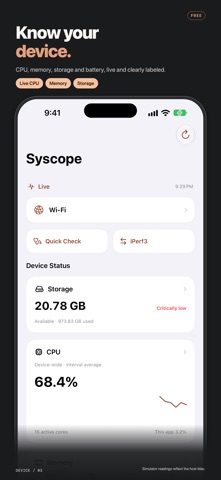
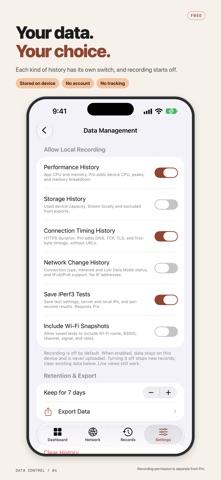
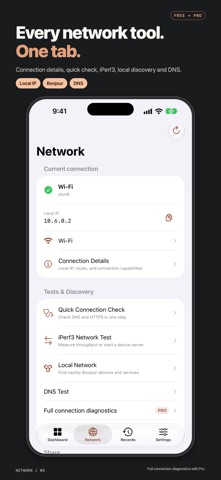
Measure real speeds on your own network with iPerf3. Run upload and download tests between your iPhone or iPad and a Mac, PC, NAS, or another device running iPerf3 on your local network — or turn Syscope into an iPerf3 server and pair with a QR code. Is it the Wi-Fi or the internet? Did moving closer to the router make a difference? Syscope also brings device information and network checks together, so CPU, memory, storage, DNS, and connection details are all in one place. INCLUDED FOR FREE • Live CPU, memory, storage, battery, and thermal information, with device-wide and Syscope-specific readings clearly labeled. • A one-hour view of locally recorded metric history. • Connection details, local IP addresses, DNS lookup, and TCP connection checks. • A quick health check that pings your router, then checks DNS and HTTPS, to show whether a problem is more likely on your Wi-Fi or beyond it. Includes a shareable summary. • Bonjour discovery and manual iPerf3 server entry. • TCP upload and download tests: 10 seconds, one stream. • Foreground iPerf3 server mode and QR-code pairing on a local network. • A one-time Wi-Fi reading through an optional Shortcut, with suggestions for weak signal, low signal-to-noise ratio, or an older Wi-Fi standard. On supported iPhone and iPad models, it also tells you when enabling 160 MHz on your router could raise the link rate. • Widgets for quick access. SYSCOPE PRO — ONE-TIME PURCHASE • 24-hour and 7-day history views, configurable local retention, and metric export. • Repeated DNS measurements and detailed HTTPS connection timings. • UDP tests, parallel streams, custom duration or transfer size, and on-demand local-subnet discovery on a single TCP port. • Latency under load: Syscope pings your router before and during each iPerf3 test to reveal bufferbloat, the queueing delay that makes calls and games stutter. • Saved tests, labels, reusable profiles, reruns, and side-by-side comparisons. • Room-by-room comparison: tag each test with a location to compare speed, Wi-Fi signal, and latency across your home or office. • Continuous Wi-Fi readings and charts through the optional Shortcut. • PDF, JSON, and CSV test reports. Network identifiers are hidden by default. Pro is an optional, non-consumable in-app purchase, not a subscription. See the app for your local price. Restore purchases with the Apple Account used for the purchase. YOUR DATA STAYS WITH YOU No account, ads, or tracking. The Syscope developer does not collect your personal data. Metrics and saved tests are processed and stored on your device unless you choose to export or share them. Network diagnostics send traffic to the target you choose, which can see your source IP. Purchases are handled by Apple. Optional Wi-Fi name access may require iOS location permission; Syscope does not read or save location coordinates. BEFORE YOU TEST iPerf3 requires a reachable compatible server, such as another device on your network. Syscope does not provide a public speed-test server network. Throughput tests can use substantial traffic; cellular testing is disabled by default. Server mode runs only in the foreground on Wi-Fi or a wired local network. Syscope does not list other apps or show their individual memory use. It records metrics while in the foreground, not as an always-on background monitor. Requires iOS 17 or later. Available for iPhone and iPad, in English and Traditional Chinese.
What's new · 1.1.0
• Find where the slowdown is: the health check now pings your router first, then tells you whether a problem is more likely on your Wi-Fi or beyond it. • Wi-Fi suggestions: get tips for weak signal, interference, or an older Wi-Fi standard. On supported devices, see when enabling 160 MHz on your router could raise the link rate. • Pro: Latency under load shows how much your router's delay grows during an iPerf3 test (bufferbloat). • Pro: Tag tests with a location and compare speed, signal, and latency room by room.
Details