

MagiCal: Scan to Calendar
Mike Swirsky · Productivity
Independent analytics for this App Store listing. AppTracker is not affiliated with Mike Swirsky.
Chart standing · US
What changed · US
Listing changes AppTracker has observed for this app in this storefront — new versions, price moves, rating shifts, and store copy.
Improved event names when scanning invitations and letters. MagiCal now combines multi-line invitation titles and better identifies event announcements within longer letters while preserving dates and time ranges. Please continue to review scanned details before adding them to your calendar.
In-app purchases · US
What this app sells inside itself, grouped by kind and priced for this storefront.
Screenshots




Similar apps
Competitors and close alternatives, as estimated by AppTracker.
 PDF Scanner | Document Scan
Rashed Obaid
PDF Scanner | Document Scan
Rashed Obaid
 CamScan: PDF Scanner, OCR
Yevheniia Kyian
CamScan: PDF Scanner, OCR
Yevheniia Kyian
 Scanner - Edit PDF & documents
AppRover
Scanner - Edit PDF & documents
AppRover
 Doc Scan - PDF Scanner
IFUNPLAY CO., LTD.
Doc Scan - PDF Scanner
IFUNPLAY CO., LTD.
 Scanner App Pro: Scan Edit PDF
IFUNPLAY CO., LTD.
Scanner App Pro: Scan Edit PDF
IFUNPLAY CO., LTD.
 Smart Receipts - Captize Pro
MWare Technologies AS
Smart Receipts - Captize Pro
MWare Technologies AS
 CamScanner + | OCR Scanner
Linguan Data
CamScanner + | OCR Scanner
Linguan Data
 ScanFolio - Doc Scan & Editor
Solueman Hussain
ScanFolio - Doc Scan & Editor
Solueman Hussain
About
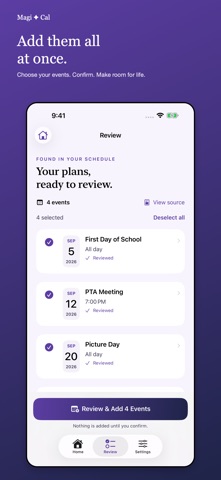
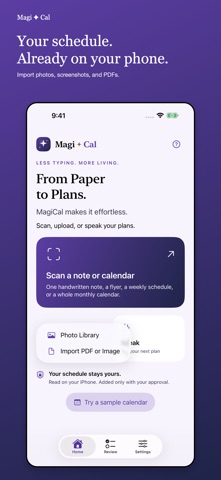
From Paper to Plans — MagiCal makes it effortless. Turn notes, flyers, appointment cards, screenshots, and monthly calendars into editable events. Try three successful scans free on this device, then unlock unlimited scanning and spoken or typed plans with a one-time in-app purchase. No subscription. Existing paid customers keep unlimited access. Website access is separate. SCAN, UPLOAD, OR SPEAK Capture a page with your iPhone camera, choose images from Photos, import PDFs and images from Files, or type and paste a plan. Supported on-device English speech recognition is also available. Import up to 12 pages, with files up to 35 MB. Failed scans and reprocessing the same draft do not use another free try. REVIEW BEFORE ADDING Review each event’s full date, year, start and end times. When no year is written, MagiCal suggests the next occurrence, including today. Written years are preserved. Compare suggestions with the original and edit titles, dates, times, locations, notes, reminders, and repeat rules. Select your events and confirm before anything is added to Calendar. Possible duplicates require your decision. CHOOSE YOUR CALENDAR Works with writable calendars configured on your iPhone, including iCloud, Google, Outlook, and Exchange. If a calendar is missing, create an empty calendar in a supported account, follow account-setup guidance, or refresh the list. YOUR SCHEDULE STAYS YOURS Image recognition and supported speech recognition run on your device. No MagiCal account, advertising, or analytics SDK. Unfinished drafts stay locally so you can resume or discard them. Events you add may synchronize through your calendar provider. English schedule recognition. Requires iOS 17 or later. Handwriting and unusual layouts may require corrections. Speech requires supported on-device English recognition; typed entry is always available. Always check event suggestions against the original. Questions or feature requests? Contact help@magi-cal.com.
What's new · 1.1.1
Improved event names when scanning invitations and letters. MagiCal now combines multi-line invitation titles and better identifies event announcements within longer letters while preserving dates and time ranges. Please continue to review scanned details before adding them to your calendar.
Details