

Jotter - Notes App
Jashandeep Singh · Productivity
Independent analytics for this App Store listing. AppTracker is not affiliated with Jashandeep Singh.
Chart standing · US
What changed · US
Listing changes AppTracker has observed for this app in this storefront — new versions, price moves, rating shifts, and store copy.
Jotter 1.3 polishes everything, and adds the things you asked for. NEW - Export every note from Settings, as Markdown files with their pictures, in a folder per folder. - Sharing a note as Markdown now brings its photos and drawings along. - Clear ticked items, then change your mind with Undo. - Add a link from the formatting panel, with a paste button. - A floating player for voice notes, so you can keep reading while one plays. - Widgets that look like Jotter: a sticky-note New Note, and list progress on Recent Notes. - Save text and Markdown files from the Share button straight into a note. A FRESH COAT - Tips sit at the top of Settings as sticky notes, and Settings shows when you last synced. - A cleaner Share sheet, voice recorder, folder editor and New sheet. - A note in Recently Deleted can be restored from right inside it. - Duplicating a note opens the copy. FIXES - Closing a drawing with unsaved strokes now asks first. - Typing after a picture starts with a capital letter again. - Backspace at the start of a checklist item behaves. - Text joined onto a picture line is no longer lost. - Undoing a delete or archive brings back the note's pin and reminder. - Notes edited on another device update the widgets and Search. - Right-to-left writing gets its quote bar on the correct side. - Very large text sizes keep the note's top line and list bar to one row. - Tags no longer run into the words beside them. Enjoying Jotter? A quick rating on the App Store helps other people find it.
Screenshots



About
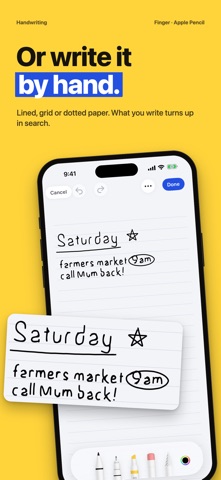
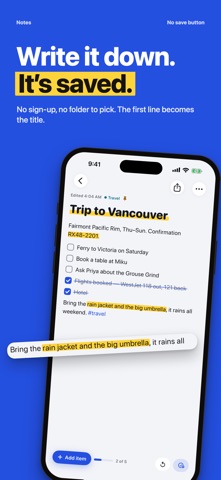
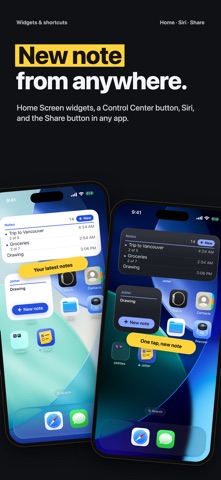
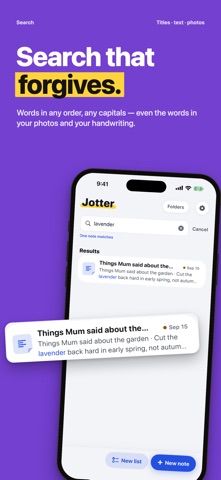
Jotter is the notes app for the moment you think “I need to write this down.” Tap New note and start typing: the first line becomes the title, and the note is saved before you finish the sentence. No sign-up, no folder to pick, no save button. WHY JOTTER • Fast: one tap on New note, the widget or Control Center, and you are typing • Free: no subscription, no ads, nothing locked • Private: no account and no Jotter server. Notes sync through your own iCloud • Yours: export any note as a PDF or text, or every note as Markdown files CHECKLISTS THAT TICK Type [] and a space to start a checklist. Tick items off with a tap — groceries, packing lists, the ten things to do before Friday. HANDWRITING WITH APPLE PENCIL Write or draw on iPad with Apple Pencil, or with your finger on iPhone, on blank, lined, grid or dotted paper. The page grows as you go. Your handwriting is read on the device, so it turns up in search, and it converts to typed text with a tap. PHOTOS, SCANS AND VOICE NOTES Take photos, scan documents, record voice notes and add files right inside a note. The text in your photos and scans is searchable, and voice notes are transcribed on your device. SEARCH THAT FORGIVES Type a word or two, in any order, without worrying about capitals or accents. Jotter searches titles, text, tags, handwriting and the words inside your pictures, and shows you the sentence it found. ORGANISE LATER, OR NEVER Pin what matters. Write a #tag and it becomes a filter. Make a folder when a set of notes wants a name. Or don’t: everything is always in All Notes. CAPTURE FROM ANYWHERE • Home Screen and Lock Screen widgets • A New note button in Control Center • Siri: “Jot down in Jotter” • The Share button in any app: save a link, photo or text into a new note or one you already have FORGIVING, AND PRIVATE Deleted notes wait in Recently Deleted for 30 days. Lock a private note behind Face ID. Set a reminder on any note. No analytics, no ads, no tracking — Jotter has no server at all. MADE FOR IPHONE AND IPAD A calm paper-and-ink design with a little comic-book fun around the edges. Light and dark mode, Dynamic Type, VoiceOver, and keyboard shortcuts on iPad, where your folders, your notes and the open note sit side by side. Jotter is free. If it earns a place on your Home Screen, you can buy the maker a coffee in Settings. It unlocks nothing, and it is entirely optional. Privacy: https://thebighead.ca/jotter/privacy Terms: https://thebighead.ca/jotter/terms
What's new · 1.3
Jotter 1.3 polishes everything, and adds the things you asked for. NEW - Export every note from Settings, as Markdown files with their pictures, in a folder per folder. - Sharing a note as Markdown now brings its photos and drawings along. - Clear ticked items, then change your mind with Undo. - Add a link from the formatting panel, with a paste button. - A floating player for voice notes, so you can keep reading while one plays. - Widgets that look like Jotter: a sticky-note New Note, and list progress on Recent Notes. - Save text and Markdown files from the Share button straight into a note. A FRESH COAT - Tips sit at the top of Settings as sticky notes, and Settings shows when you last synced. - A cleaner Share sheet, voice recorder, folder editor and New sheet. - A note in Recently Deleted can be restored from right inside it. - Duplicating a note opens the copy. FIXES - Closing a drawing with unsaved strokes now asks first. - Typing after a picture starts with a capital letter again. - Backspace at the start of a checklist item behaves. - Text joined onto a picture line is no longer lost. - Undoing a delete or archive brings back the note's pin and reminder. - Notes edited on another device update the widgets and Search. - Right-to-left writing gets its quote bar on the correct side. - Very large text sizes keep the note's top line and list bar to one row. - Tags no longer run into the words beside them. Enjoying Jotter? A quick rating on the App Store helps other people find it.
Details