

TimeBox Tracker - Do More
Ona Pacholo Asis · Productivity
Independent analytics for this App Store listing. AppTracker is not affiliated with Ona Pacholo Asis.
Chart standing · US
What changed · US
Listing changes AppTracker has observed for this app in this storefront — new versions, price moves, rating shifts, and store copy.
Price & rating history · US
Reconstructed from the listing changes AppTracker has observed in this storefront. A field is charted once it has changed more than once, and each line starts at the value it moved from.
Price · 4.99 USD now · 3 changes on record
Screenshots


About
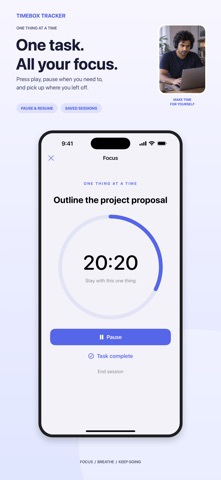
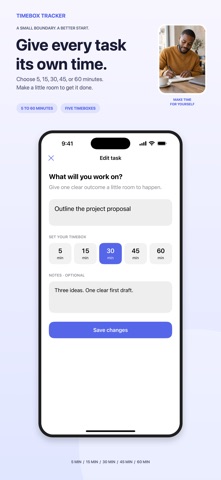
Make time for what matters with a simple task queue and short focus sessions. Choose your top 3, give each a timebox, and stay with one thing at a time. Your tasks and focus sessions stay on this device, with no account or subscription. FOCUS ON YOUR TOP 3 • Add tasks with a clear outcome and optional notes • Sort tasks into priority order, with the first three as your focus list • Move an important task straight to the top when plans change • Keep extra tasks waiting in the queue until there is room to focus TIMEBOX YOUR WORK • Pick a timebox for each task: 5, 15, 30, 45, or 60 minutes • Start a focus session from any of your top three tasks • Pause or resume whenever you need a break • End early or let the timer reach zero, the app saves your focused time • Decide what happened at the end: mark complete, keep for later, or start another timebox • Closing the focus screen keeps the timer running in the background SEE YOUR PROGRESS • View a history of completed tasks and finished focus sessions • See partial focus time, even if you stopped before the timer ended • Return completed tasks to the queue if there is more to do STAY ON TRACK YOUR WAY • Optional one-shot alert when a running timebox ends • Turn focus alerts on or off at any time • Change appearance: follow the system, or pick light or dark theme • Choose a default timebox duration that fits most of your tasks YOUR DATA, YOUR DEVICE • Tasks, ordering, and session history are stored locally on your iPhone • Export your current tasks as CSV for your own records or backup • Export previous habit history from earlier versions of the app • Clear everything with a factory reset when you want to start fresh • Confirmed data deletion, no hidden cloud copy, and no login required Turn big plans into small, focused timeboxes. Add your first task, choose a duration, and protect a little time for what matters today. Standard EULA: https://www.apple.com/legal/internet-services/itunes/dev/stdeula/
Details