

Respy – Smart Break Reminder
Valery Lacombe · Productivity
Independent analytics for this App Store listing. AppTracker is not affiliated with Valery Lacombe.
Chart standing · US
What changed · US
Listing changes AppTracker has observed for this app in this storefront — new versions, price moves, rating shifts, and store copy.
What's new in Respy 1.3 - Respy goes Liquid Glass: the buttons on iPhone, iPad and Apple Watch take on the new glass design of iOS 26. One green everywhere, the icon's. - An (i) next to "Today" explains every mark on your day timeline. - The app now turns to landscape, including on the iPhone Duo outer display. - On iPad, buttons are no longer cut off. - "+5 min" shows right away on the break Live Activity. - The Today card explains why the break target is lower on days of meetings and calls. - The advice in your summary changes from one hour and one day to the next, on widgets and the watch too. In the evening it looks to tomorrow. - The evening summary puts your week in a headline, then one finding per line. The evening verdict stays the same the next morning and in History. - A language Respy doesn't speak shows in English. Weeks start on Monday. You need Respy 1.3 on your Mac to see it all.
Screenshots



About
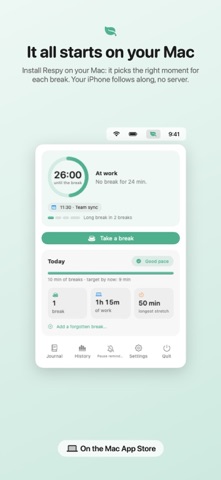
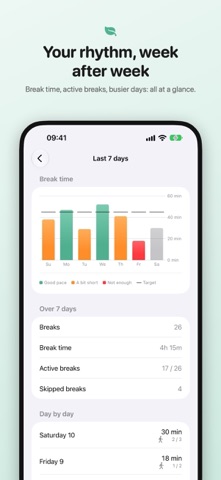
Respy helps you take real breaks during your workday. The Mac app picks the right moment. On your iPhone, iPad and Apple Watch, you follow your breaks and answer them without going back to your desk. Respy requires the Respy app on your Mac, with the iPhone relay turned on (Settings › General on the Mac). Breaks at the right moment Your Mac waits for a natural pause: the end of a meeting, a switch between tasks, a quiet stretch. Never during a video call. When it's time, your iPhone and Watch let you know. Answer in one tap Take your break or snooze it from the notification, the app, the widget, Control Center or your wrist. Your Mac follows along. The countdown in sight During a break, a Live Activity shows the time left on the Lock Screen and in the Dynamic Island. End it or extend it without opening the app. Your Watch shows it in its Smart Stack too. Your day of breaks Next break, breaks taken today, the time of each one, and what's holding a break back (a meeting, for example). Breaks that get you moving With your permission, Respy reads your steps and stand hours from Health to tell whether you actually moved during a break. Read only, and those numbers never leave your iPhone. Your rhythm, week after week Break time, active breaks, busier days: your week at a glance, on iPhone and on Watch. On your wrist The Watch app shows how your day is going and the time until your next break, and lets you answer. Complications and a Smart Stack widget that rises to the top when a break is near. Your data stays yours No account, no Respy server, no tracking. The relay goes through your private iCloud, which we can't read. Requires iOS 26 or watchOS 26, and a Mac running Respy.
What's new · 1.3
What's new in Respy 1.3 - Respy goes Liquid Glass: the buttons on iPhone, iPad and Apple Watch take on the new glass design of iOS 26. One green everywhere, the icon's. - An (i) next to "Today" explains every mark on your day timeline. - The app now turns to landscape, including on the iPhone Duo outer display. - On iPad, buttons are no longer cut off. - "+5 min" shows right away on the break Live Activity. - The Today card explains why the break target is lower on days of meetings and calls. - The advice in your summary changes from one hour and one day to the next, on widgets and the watch too. In the evening it looks to tomorrow. - The evening summary puts your week in a headline, then one finding per line. The evening verdict stays the same the next morning and in History. - A language Respy doesn't speak shows in English. Weeks start on Monday. You need Respy 1.3 on your Mac to see it all.
Details