

Tip Tracker: Shift Earnings
Eutopix Labs P S A · Finance
Independent analytics for this App Store listing. AppTracker is not affiliated with Eutopix Labs P S A.
Chart standing · US
What changed · US
Listing changes AppTracker has observed for this app in this storefront — new versions, price moves, rating shifts, and store copy.
Tiploom is now on your Apple Watch. • Apple Watch app: log a cash or card tip from your wrist, see today's and this week's tips, and start or end your shift clock. It works when your iPhone is out of reach; entries are added to your iPhone when it is nearby again. A watch-face complication opens tip entry. • Shift clock on iPhone and Apple Watch: tap Start shift, then End shift, and your start time, end time and hours are filled in (wages too, if your saved job has an hourly rate). • Siri and Shortcuts: "Log a cash tip in Tiploom", "Log a card tip in Tiploom", "Today's tips in Tiploom", "Start my shift in Tiploom", "End my shift in Tiploom". • New "Log tips" widget for the Home Screen and Lock Screen, and a Control Center control (iOS 18 or later). • Pro: widgets with today's tips, this week's tips and earnings-goal progress, and a Live Activity on the Lock Screen and in the Dynamic Island while your shift clock is running. • Log tips opens with the amount ready to type and Save within reach of the keyboard. • After midnight, tips go to the shift that began the evening before. • Adding hours to a shift logged with Log tips fills in your saved job's hours, rate and tip-out. • Tips per hour and goal progress are shown even before wages are entered. • Automatic backups no longer pile up: older copies are thinned out. Re-importing a CSV export no longer duplicates shifts. • Clearer messages when a shift cannot be saved. The Overview date and job pickers stay visible when a period is empty.
Screenshots



About
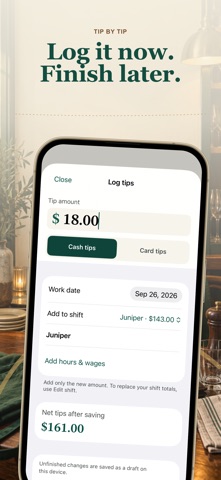
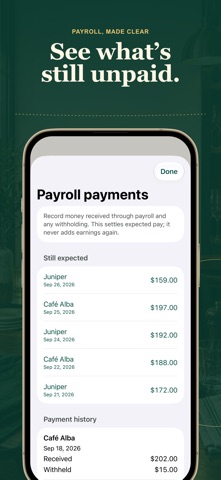
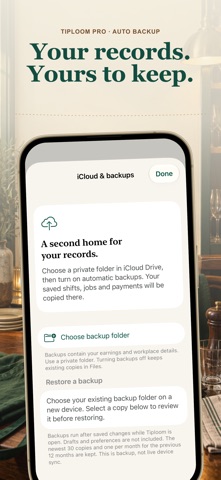
Know what every shift is really worth. Tiploom is a private tip tracker for servers, bartenders and anyone whose income includes tips. Log cash and card tips in three taps, add hours and wages when the shift ends, and see your real hourly rate. LOG TIPS FAST • One "Log tips" button: amount, cash or card, save. Tips go straight into tonight's shift. • Shift clock: tap Start shift when you arrive and End shift when you leave. Your start time, end time and hours are filled in, and your wages too if your saved job has an hourly rate. • Start and end times, or hours and minutes, with unpaid breaks. Overnight shifts and clock changes are handled correctly. • Card tips received now or paid later through payroll, including partly paid tips. APPLE WATCH, WIDGETS AND SIRI • Apple Watch app: log a cash or card tip from your wrist with a number pad, see today's and this week's tips, and start or end your shift clock. • Works when your iPhone is out of reach: entries are stored on your Watch and added to your iPhone ledger when it is nearby again. The Watch app is a companion and needs Tiploom on your iPhone. • A watch-face complication, a free "Log tips" widget for the Home Screen and Lock Screen, and a Control Center control (iOS 18 or later) all open tip entry. • Siri and Shortcuts: say "Log a cash tip in Tiploom" or "Log a card tip in Tiploom" and Siri asks for the amount, without opening the app. From a locked iPhone, the tip is added once you unlock it. Also: "Today's tips in Tiploom", "Start my shift in Tiploom" and "End my shift in Tiploom". KNOW YOUR NUMBERS • This week's net tips, effective hourly rate and tips per shift on the home screen. • A week chart: tap a day to see its shifts. • Optional sales per shift, giving tip % of sales. • Tip-out as an amount, % of tips or % of sales, with presets per job. • Payroll payments and withholding, so you can see what is still expected. YOUR MONTH, ON RECORD • Monthly tip record: cash tips, card tips, tips received from coworkers, tips paid out and net tips. • Share the month as CSV. PDF comes with Pro. FREE, WITH NO ADS Unlimited tips and shifts, full history and corrections, week and month views, one saved job preset, payroll records, CSV export, manual backups and restore, Apple Watch logging, the shift clock, Siri, and the Log tips widget and control. No account and no ads. TIPLOOM PRO Year, all-time and custom reports · Weekday insights · Earnings goal · Multiple saved jobs · PDF reports · Automatic iCloud Drive backups · Widgets with today's tips, this week's tips and earnings-goal progress · Live Activity for your running shift, with elapsed time and tips so far. Monthly and yearly plans renew automatically until canceled. Lifetime is a single payment. All plans include the same Pro features. Your records stay on your device and in the backup folder you choose. Apple Watch entries travel directly between your Watch and your iPhone. No developer server. Tiploom is a personal record, not a tax calculator or an employer payroll service. Terms of Use: https://www.apple.com/legal/internet-services/itunes/dev/stdeula/ Privacy: https://tiploom.com/privacy/
What's new · 1.1.0
Tiploom is now on your Apple Watch. • Apple Watch app: log a cash or card tip from your wrist, see today's and this week's tips, and start or end your shift clock. It works when your iPhone is out of reach; entries are added to your iPhone when it is nearby again. A watch-face complication opens tip entry. • Shift clock on iPhone and Apple Watch: tap Start shift, then End shift, and your start time, end time and hours are filled in (wages too, if your saved job has an hourly rate). • Siri and Shortcuts: "Log a cash tip in Tiploom", "Log a card tip in Tiploom", "Today's tips in Tiploom", "Start my shift in Tiploom", "End my shift in Tiploom". • New "Log tips" widget for the Home Screen and Lock Screen, and a Control Center control (iOS 18 or later). • Pro: widgets with today's tips, this week's tips and earnings-goal progress, and a Live Activity on the Lock Screen and in the Dynamic Island while your shift clock is running. • Log tips opens with the amount ready to type and Save within reach of the keyboard. • After midnight, tips go to the shift that began the evening before. • Adding hours to a shift logged with Log tips fills in your saved job's hours, rate and tip-out. • Tips per hour and goal progress are shown even before wages are entered. • Automatic backups no longer pile up: older copies are thinned out. Re-importing a CSV export no longer duplicates shifts. • Clearer messages when a shift cannot be saved. The Overview date and job pickers stay visible when a period is empty.
Details