

Spensyble
Matt Cox · Finance
Independent analytics for this App Store listing. AppTracker is not affiliated with Matt Cox.
Chart standing · US
What changed · US
Listing changes AppTracker has observed for this app in this storefront — new versions, price moves, rating shifts, and store copy.
A clearer way to see your money until payday. - Day by day: a new calendar under your Cash trajectory shows what you'll have at the end of every day until payday, with a daily pace. Tap any day to try a spend and see how it changes the days after it. It's only a what-if: nothing is saved and your real number never changes. - One-time expenses: add a single expense, like a dentist visit or a repair, from the Bills screen. - Start with your balance: the first time you open Results, you're asked for your balance and watch your number appear. - Stay current: Spensyble now tells you when the balance you entered is a few days old, and your payday reminder asks for today's balance. - Share your number as text or as a picture. - Rate Spensyble any time from Settings. - Imports statements from more banks, including files that label columns "Narrative", "Particulars" or "Value".
Screenshots




About
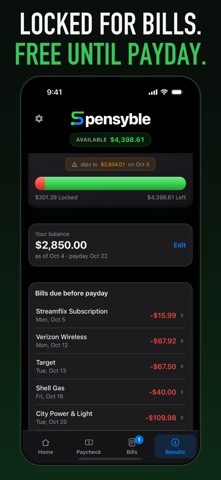
How much can you actually spend right now, without running short before payday? Spensyble answers that one question. Import a bank statement you already have, confirm your bills and paychecks, and see your true safe-to-spend balance, not just the number your bank shows. HOW IT WORKS • Import a statement export from your bank as CSV, XLSX, or PDF. No bank login. No account linking. • Spensyble reads your transaction history and finds your recurring bills and paychecks on its own, with a confidence match shown for each one. Keep the ones that are right, dismiss the rest. • Enter your current balance and your next payday. • See your cash trajectory: what's already spoken for by upcoming bills, and what's genuinely free to spend until you're paid again. • See every day until payday: a calendar shows your balance at the end of each day. Tap a day to try a spend and see how it changes the rest of the cycle. Nothing is saved. • Add one-time expenses, like a dentist visit, alongside your recurring bills. Not sure yet? Tap "See it with sample data" and walk through the whole flow before you upload anything of your own. PRIVATE BY DESIGN Your statements are processed on your device. There is no Spensyble server, and your transactions, balances, and bills are never sent anywhere or synced. The only network requests the app makes are to handle your subscription, through Apple and our subscription provider, RevenueCat. Your statements stay on your phone, full stop. WHAT SPENSYBLE IS (AND ISN'T) It's a calculator, not a coach. There are no categories to maintain, no savings goals, no advice. It doesn't connect to your bank, and it doesn't offer financial, investment, or tax guidance. It tells you, clearly, whether you can afford it before Friday. FREE TO TRY Statement import and bill and paycheck detection are free. A 7-day free trial unlocks the rest: • Balance projection through payday • Cash trajectory and the bills due before payday • Day-by-day calendar with what-if spends • Monthly totals and trends After the trial, Spensyble is $79.99 per year (save 33% vs. monthly) or $9.99 per month. Subscription details: Payment is charged to your Apple ID account at confirmation of purchase. Subscriptions renew automatically unless canceled at least 24 hours before the end of the current period. Manage or cancel in your App Store account settings. Any unused portion of a free trial is forfeited when you purchase a subscription. Terms of Use: https://www.spensyble.com/terms
What's new · 1.4
A clearer way to see your money until payday. - Day by day: a new calendar under your Cash trajectory shows what you'll have at the end of every day until payday, with a daily pace. Tap any day to try a spend and see how it changes the days after it. It's only a what-if: nothing is saved and your real number never changes. - One-time expenses: add a single expense, like a dentist visit or a repair, from the Bills screen. - Start with your balance: the first time you open Results, you're asked for your balance and watch your number appear. - Stay current: Spensyble now tells you when the balance you entered is a few days old, and your payday reminder asks for today's balance. - Share your number as text or as a picture. - Rate Spensyble any time from Settings. - Imports statements from more banks, including files that label columns "Narrative", "Particulars" or "Value".
Details