

Take Studio
Mubarak Almahmeed · Photo & Video
Independent analytics for this App Store listing. AppTracker is not affiliated with Mubarak Almahmeed.
Chart standing · US
What changed · US
Listing changes AppTracker has observed for this app in this storefront — new versions, price moves, rating shifts, and store copy.
• Adds an adaptive iPhone Duo workspace, with your preview and editing controls together when space allows. • Fixes a preview-loading error when returning from an edit to your project.
Screenshots


About
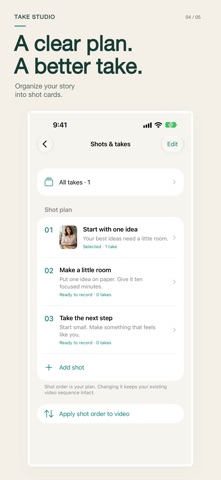
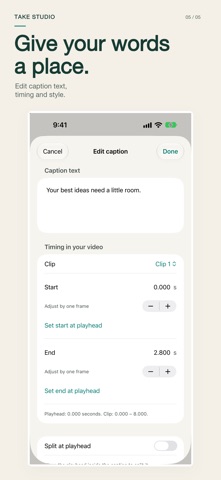
Your script. Your takes. Your finished video. Turn what you want to say into a video you want to share. Take Studio brings planning, prompted recording, take selection, editing and captions together on iPhone. PLAN WHAT YOU WANT TO SAY Write, paste or import a script. Break it into shot cards so each part of your story has a clear place. FIND YOUR BEST TAKE Record with an adjustable on-screen prompter, or import SDR videos from Photos and Files. Keep alternatives, compare takes and choose the performance you want. SHAPE THE FINISHED VIDEO Trim pauses, split and reorder clips, adjust framing and control each clip's sound. Your original footage stays intact. Undo and redo let you refine the edit. MAKE EVERY WORD COUNT Create and correct captions manually, adjust their timing and choose their appearance. Optional on-device transcription is available on supported devices and languages; an Apple model download may be needed. The manual workflow does not require speech models. EXPORT WITHOUT A WATERMARK Create portrait, square or landscape videos up to five minutes long as 1080p SDR MP4 at 30 fps. Choose whether to include captions. Prompter text and recording controls never appear in the finished video. Save to Photos, save to Files or use the system share sheet. KEEP YOUR WORK YOURS Projects live on your device. Save editable project backups that include your original footage. No Take Studio account, advertising or app analytics. Device backups and destinations you choose may store copies elsewhere. Project backup archives are not encrypted. START FREE. MAKE ROOM WITH PRO. The free plan includes one active project and the complete manual editing, captioning and export workflow. Archive a project to start another; archived projects remain editable and exportable. Take Studio Pro adds more active projects and reusable caption brand presets through monthly or annual auto-renewable subscriptions. The App Store shows your local price, billing period and any eligible introductory offer before purchase. Subscriptions renew automatically unless canceled through Apple. Your existing projects, media, edits, exports and backups remain accessible if Pro ends. Requires iOS 26 or later. Use SDR source video; HDR imports are not supported. Privacy policy: https://mubaraklabs.com/privacy/takestudio/ Terms of Use (Apple Standard EULA): https://www.apple.com/legal/internet-services/itunes/dev/stdeula/
What's new · 1.2
• Adds an adaptive iPhone Duo workspace, with your preview and editing controls together when space allows. • Fixes a preview-loading error when returning from an edit to your project.
Details