

Lumap : Travel Photo Map
murata makoto · Travel
Independent analytics for this App Store listing. AppTracker is not affiliated with murata makoto.
Chart standing · US
What changed · US
Listing changes AppTracker has observed for this app in this storefront — new versions, price moves, rating shifts, and store copy.
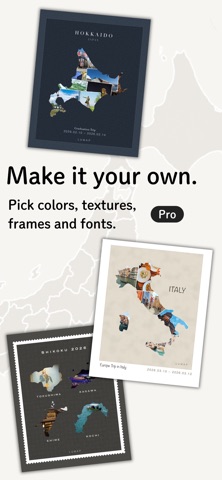
· New Styles for exported images: background colors, paper and canvas textures, frames like Polaroid and stamp, and serif or handwritten fonts · Choose the export size: 4:5 or 9:16 · Add a short note under your trip title · In Layout, you can now place text on the frame margins
In-app purchases · US
What this app sells inside itself, grouped by kind and priced for this storefront.
Screenshots




About
Turn your memories into a map. Lumap arranges your travel photos inside the shape of every prefecture and country you visit. Trip by trip, the map of Japan and the globe fill up with places you've been. - Just pick your photos Lumap fits them neatly inside the shape. Shuffle for a new arrangement any time, or place each photo yourself at any size and angle. - Beautiful even for narrow shapes For long, narrow places like Okinawa or Chile, choose the style that keeps the outline clear and fills the space around it with photos. - From a single prefecture to the whole world Every place you visit shows its cover photo on the map of Japan and on the globe. Go back to the same place as often as you like — each trip gets its own artwork. - Look back on your year See your trips, places, first-time places and days traveled for any year, plus how much of each region you've covered. - Map piece puzzle Catch the falling prefectures and drop them into place on the map of Japan. Pieces of places you've been are filled with your own photos. Try to beat your best time. - Export and share Save your artwork as an image made for social media — choose 4:5 for posts or 9:16 for stories. Turn all of Japan ("My Japan") or the entire globe ("My World") into a single image too. - Make it your own Style your exported images with background colors, paper and canvas textures, frames and fonts — from Polaroid and stamp frames to serif and handwritten fonts, including for Japanese text. Add a short note under your trip title, too. - Your photos stay on your device Photos and trip records are stored only on your device and are never uploaded. No account, no sign-in. Getting a new phone? Move everything across with a backup file. - Lumap Pro · No ads · Free layout for exported images — move, resize and rotate the artwork and the text · Export the places you choose, or everywhere you traveled, side by side with their names · Export styles — 14 more background colors, paper, canvas, washi and watercolor textures, frames like Polaroid and stamp, and fonts like serif and handwritten Monthly and yearly plans renew automatically unless cancelled at least 24 hours before the end of the current period. Terms of Use: https://rgbc5skmy2-dot.github.io/lumap-legal/terms.html Privacy Policy: https://rgbc5skmy2-dot.github.io/lumap-legal/privacy-policy.html
What's new · 1.1.0
· New Styles for exported images: background colors, paper and canvas textures, frames like Polaroid and stamp, and serif or handwritten fonts · Choose the export size: 4:5 or 9:16 · Add a short note under your trip title · In Layout, you can now place text on the frame margins
Details