

draftwriter Run!+
SinHyeok Kim · Productivity
Independent analytics for this App Store listing. AppTracker is not affiliated with SinHyeok Kim.
Chart standing · US
What changed · US
Listing changes AppTracker has observed for this app in this storefront — new versions, price moves, rating shifts, and store copy.
draftwriter Run+ is now available on iPhone, iPad, and Mac. • Added support for iPhone and Mac • Added Memo for keeping notes and ideas alongside each draft • Updated the app icon
Screenshots


About
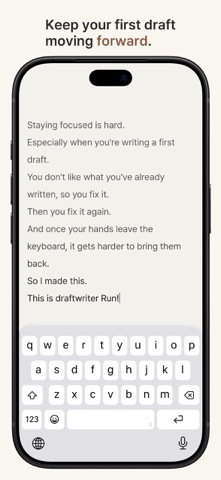
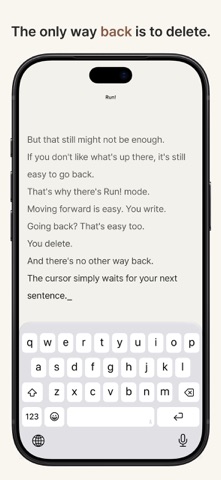
Staying focused is hard. Especially when you’re writing a first draft. You notice something you’ve already written. You don’t quite like it. And fixing it is easy. So I made this. draftwriter Run!+ keeps the line you’re writing in the center of the screen. The lines you’ve already written gradually fade into the background. So instead of constantly going back and fixing things, you can keep moving forward. Of course, you can still go back with the arrow keys, but you can’t drag across the text to select it. You can delete an entire line at once, but… doing everything that way gets inconvenient pretty quickly. So you keep writing. And maybe even that isn’t enough. In Normal Mode, you can still “use” the arrow keys. That’s why there’s RUN! Mode. Moving forward is easy. You write. Going back? That’s easy too. You delete. Other than that, there is no going back. So you keep writing forward. Until the first draft is done. After writing like that for a while, you’ll probably want to see what you’ve written. That’s what Review is for. But here, you can only “look.” You can’t edit. You can’t select anything. If you want to change something, you have to return to the writing screen and make your way back with the arrow keys. Here, you simply look through the draft you’ve written so far. That’s RUN! Run!+ keeps the same idea as the Mac version, with a few more tools for writing away from the desk. It also has a simple place to organize your writing. You can create folders and keep several drafts inside them. You can create a new draft or import a TXT file. You can rename, duplicate, export, or delete a draft too. And sometimes, while you’re writing, something comes to mind that belongs somewhere else. A scene for later. A name you don’t want to forget. A line you might need much further into the story. That’s what Memo is for. Every draft has its own memo, kept separate from the draft itself. Open it when you need it, write down what you want to remember, then close it and keep writing. There are no complicated project management features. It simply gives you a place to see where your drafts are, and which one you want to continue next. Beside each draft, you’ll also see the last few characters of the writing that’s been waiting for you. And if you want, you don’t have to take your hands off the keyboard. Choose a folder, open a draft, create a new one, save, switch modes, and move back through the app. The main controls in draftwriter Run! for iPad can all be operated with a hardware keyboard. There’s also a Keyboard Shortcuts screen inside the app where you can see all the available shortcuts at once. Oh, one more thing. If you stop writing for more than a minute, a timer appears at the bottom of the screen. It doesn’t show how long you’ve been writing. It shows how long you’ve been stopped in order to write. The time you spent pausing and thinking about what comes next. And it would be pretty awful to lose a draft after all that. So while you write, RUN keeps a local recovery copy every two minutes. This is a little different from continuously autosaving over the actual document. Your actual writing is stored as standard TXT files. By default, RUN keeps your drafts on your iPad. If you prefer, you can choose another folder from Settings. The folders are real folders, and the drafts are real TXT files. Your draft is saved when you tap Save, press Command-S, or leave the writing screen. Changing the library folder doesn’t move or delete your existing files. And of course, saving once when you first create a draft is still a good idea.
What's new · 1.2
draftwriter Run+ is now available on iPhone, iPad, and Mac. • Added support for iPhone and Mac • Added Memo for keeping notes and ideas alongside each draft • Updated the app icon
Details