

Editor for Mandala V3
Steve Joslin · Music
Independent analytics for this App Store listing. AppTracker is not affiliated with Steve Joslin.
Chart standing · US
Screenshots



About
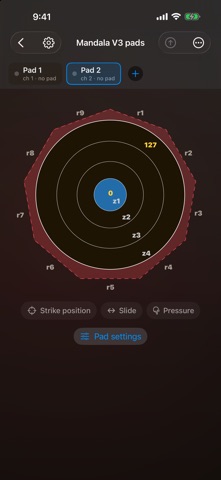
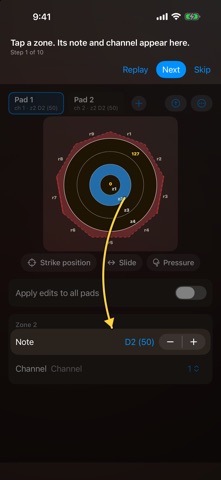
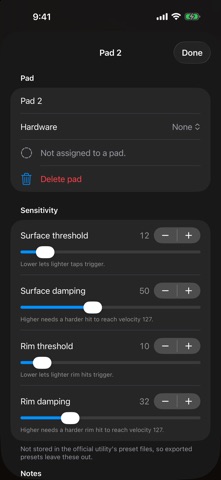
Edit your Mandala V3 drum pads and Mandala Synapse pedal interface from your iPad or iPhone over USB. MANDALA V3 PADS Plug in a pad and its settings appear on a card. Each plugged-in pad opens its own card, sorted A to Z until you drag them into your own order. Close a card you don't need and reopen it from the + menu. • Set the note and channel for each of the four zones and all nine rim edges. • Send rim pressure, strike position, and slide as MIDI controllers, each with its own number and channel. • Tune surface and rim threshold and damping, and the velocity range. • Change every zone or every rim at once with Apply edits to all zones and Apply edits to all rims. • Hit a rim and it flashes on the drawing. Find rims switches every rim on so you can locate them, then puts the pad's own settings back, even if you unplug or quit first. • Send writes your settings to the pad and reads them back to check they match. • No pad to hand? Set one up offline and send it later. PRESETS AND SETUPS Save one pad's settings as a preset, notes included, and load it onto any pad. A setup saves every open pad at once by serial number, then loads and sends them all in one tap. Keep one setup for pads beside your kit and another for pads as the main kit. Import and export the official utility's preset files. MANDALA SYNAPSE Edit all four inputs: two kick inputs, a hat or second expression pedal on Input 3, and an expression pedal on Input 4. Every edit goes straight into the Synapse. • Each input has a live monitor showing the note, velocity, and controller value it sends. • MIDI that matches no input shows in its own strip, so you can see which setting to change. • Strength, sensitivity, curve, and velocity range for each kick, with a graph of the result. • Hat presets for the Roland FD-7 and FD-8, HAT Kat, Yamaha HH65, Alesis RealHat, and Simmons hi-hat controller. • Raw mode and step-by-step calibration for hat and expression pedals. • Save presets for each input, and setups for every input at once. • Factory reset when you need a clean start. BUILT IN A user guide and a step-by-step tutorial for the pad editor. Hit-to-select lets you hit a zone or rim and jump straight to it in the editor. Requires a Mandala V3 pad or Mandala Synapse connected by USB. Not affiliated with Synesthesia Corporation.
Details