

Simul: Live Captions
钊 邓 · Productivity
Independent analytics for this App Store listing. AppTracker is not affiliated with 钊 邓.
Chart standing · US
What changed · US
Listing changes AppTracker has observed for this app in this storefront — new versions, price moves, rating shifts, and store copy.
· New: History. Once a captioning or face-to-face session ends, it's saved on this device — read it back in full, or export a transcript or subtitle file. Titles are written by the on-device model, so you don't have to. · Records stay with you: nothing is uploaded, and there is no cloud copy. Set them to delete automatically after 7 or 30 days, delete a single session, or clear everything. Turn saving off entirely in Settings. · The home screen was rebuilt. Listen and Face-to-face are now two modes of the same button — pick one, tap once, and it starts. Face-to-face used to take two taps. · The main button is always Start. If a speech model is missing, tapping it downloads it in place and starts on its own when ready. If a translation pack is missing, it starts anyway with source-language captions. · Face-to-face now works out who is speaking on its own — no need to tap before each turn. If it picks the wrong side, tap that half to switch it. · Older conversations saved without translations (because the pack wasn't installed at the time) can now be filled in from History. · The interface follows your system's light or dark appearance. The captioning and face-to-face screens stay pure black — that's for legibility.
Screenshots





About
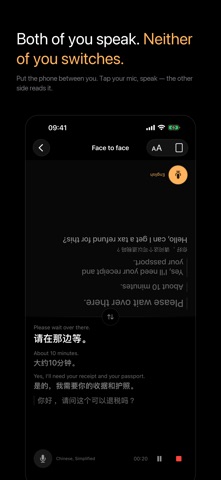
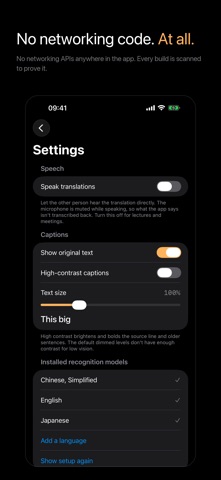
When you can't follow, just put your phone down. Simul turns what you hear into bilingual captions in real time: the original on top, the translation below, sentence by sentence as they're spoken. ■ Entirely on this device Recognition and translation both run locally. Audio and text are never uploaded and never touch a server. It works in Airplane Mode — go ahead and turn off your network right now and try it. ■ Where it helps · Face to face: one conversation, every turn translated — whoever speaks is detected automatically. If it picks the wrong side, tap that half to switch it. Lay the phone flat between you and one tap splits the screen so their half reads right way up · Lectures and meetings: set it on the table and follow the speaker line by line · Video: play a foreign-language video out loud and read along on screen ■ Built to be read Pure black, large type. The sentence still being spoken is dimmed and underlined; it settles once it's finished — so you always know which line can still change. Show both languages or just the translation. Caption size adjusts on its own, without changing your system text size. ■ Apple Watch Read captions right on your wrist, and start or stop from there. Put the phone down without missing anything. ■ Also · Speak the translation aloud so the other person can hear it · Generate a summary of the conversation when you're done · A Home Screen widget showing your current language pair — one tap to start · Start from Control Center, the Action button, or Siri · Continue on another device with Handoff ■ Language models download first The first time you use it, Simul walks you through downloading the recognition model for your languages. Models are managed by the system and shared across apps, so they don't count toward Simul's size. Downloading needs a network connection — after that, you never need one again.
What's new · 1.4.0
· New: History. Once a captioning or face-to-face session ends, it's saved on this device — read it back in full, or export a transcript or subtitle file. Titles are written by the on-device model, so you don't have to. · Records stay with you: nothing is uploaded, and there is no cloud copy. Set them to delete automatically after 7 or 30 days, delete a single session, or clear everything. Turn saving off entirely in Settings. · The home screen was rebuilt. Listen and Face-to-face are now two modes of the same button — pick one, tap once, and it starts. Face-to-face used to take two taps. · The main button is always Start. If a speech model is missing, tapping it downloads it in place and starts on its own when ready. If a translation pack is missing, it starts anyway with source-language captions. · Face-to-face now works out who is speaking on its own — no need to tap before each turn. If it picks the wrong side, tap that half to switch it. · Older conversations saved without translations (because the pack wasn't installed at the time) can now be filled in from History. · The interface follows your system's light or dark appearance. The captioning and face-to-face screens stay pure black — that's for legibility.
Details