

Memori: Don't Forget
Adam Gelatka · Education
Independent analytics for this App Store listing. AppTracker is not affiliated with Adam Gelatka.
Chart standing · US
What changed · US
Listing changes AppTracker has observed for this app in this storefront — new versions, price moves, rating shifts, and store copy.
Ask Memori about something you saved. Say "Memori, what did I save" or "Search my memories in Memori", and Siri answers from your library. You can turn this off under Siri, in your profile. A new Siri screen shows every phrase Memori understands, so you always know what to say. Share your flower. The picture of everything you remember can now be sent to anyone. Questions arrive more reliably. A memory saved from Siri, Shortcuts or the share sheet gets its question soon after you open the app, even after a long pause in the background. A calmer library. The title, pull to refresh and the iPad sidebar now behave like the rest of iOS, in Memori's own type.
Screenshots




About
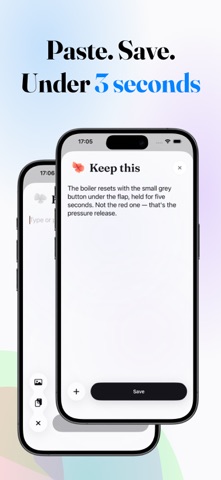
You know it. You read it, someone told you, you looked it up once — and a month later it's gone. Memori is for the things you already know and don't want to lose. A name. A number. The fact from the article, the word from the trip, the thing your kid said. Save it in three seconds, and Memori quietly asks you about it later — just before it would have slipped. Not a study app. Nothing to learn, no decks, no streaks. Just a small, beautiful place for what's yours to keep. WHAT HAPPENS TO THE THINGS YOU SAVE Save something. Type it, paste it, share it from any app, say it to Siri, or read it straight off a photo. One line is enough. Get asked. Memori turns it into a question and asks you tomorrow, then in three days, then a week, a month, half a year — for as long as you keep knowing it. A few seconds to answer, from the notification or the app. Say how it went. Forgot, almost, or got it. That is all Memori needs to decide when to bring it back. Watch it grow. Everything you keep is drawn as a petal, and your whole library becomes one flower — coral while something is new, deep blue and purple once it has stayed. Nothing to read; you can see how much you are holding. ON YOUR PHONE, NOT IN THE CLOUD Apple Intelligence reads what you saved and writes the question, entirely on your device. Nothing you save is ever sent anywhere. On a phone that can't run the model, Memori covers the key words instead and the memory becomes its own question — it works either way, and it works offline. WHAT MEMORI DOESN'T DO No decks to build. No folders. No streak to protect, no badges, nothing to lose by taking a week off. No feed, no social, no account. One screen, a handful of questions a day, at most two notifications — and a switch to stop even those. BUILT FOR iOS Widgets and a Lock Screen question. A Control Center button and an Action button shortcut. "Hey Siri, remember something with Memori." Share anything to Memori from any app. Your memories sync privately through iCloud and follow you to a new iPhone. No ads. No account. Term of use: https://gelatka.dev/apps/memori/terms/
What's new · 1.1.0
Ask Memori about something you saved. Say "Memori, what did I save" or "Search my memories in Memori", and Siri answers from your library. You can turn this off under Siri, in your profile. A new Siri screen shows every phrase Memori understands, so you always know what to say. Share your flower. The picture of everything you remember can now be sent to anyone. Questions arrive more reliably. A memory saved from Siri, Shortcuts or the share sheet gets its question soon after you open the app, even after a long pause in the background. A calmer library. The title, pull to refresh and the iPad sidebar now behave like the rest of iOS, in Memori's own type.
Details