

Video subtitle editor: Pop.
clement gasner · Photo & Video
Independent analytics for this App Store listing. AppTracker is not affiliated with clement gasner.
Chart standing · US
What changed · US
Listing changes AppTracker has observed for this app in this storefront — new versions, price moves, rating shifts, and store copy.
POP goes into overdrive: • Combine multiple clips into one montage and rearrange them easily. • Import long videos with a clearer progression and faster processing. • Automatically remove silences for a more dynamic rhythm. • Add your own MP3s, adjust their volume, and save them in “My Music”. • Reframe and zoom each segment independently, even after splitting a video. • Try new subtitle styles, colors, GIFs, Pop, and sound effects. • Move subtitles and Pop directly in the player and on the timeline. • Smarter Pop selection is now more contextual, faster, and shows progress. This update also fixes several audio, preview, clip deletion, and stability issues.
Screenshots


About
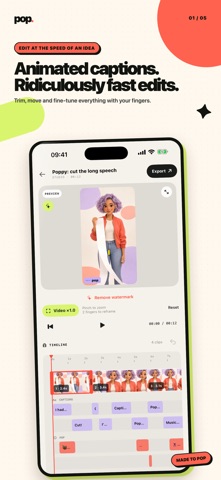
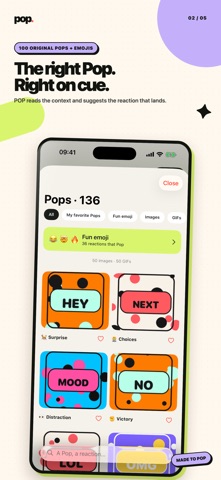
Make every second count with POP, the video editor built for short-form creators. Turn a talking video into a fast, entertaining clip with readable captions, well-timed visual reactions and a timeline you can control with your fingers. CAPTIONS THAT HOLD ATTENTION • Generate timed captions from speech • Choose karaoke, editorial, punchy and other animated styles • Move captions directly in the player • Edit every line, highlight and timing SMART POPS • POP reads the context of your transcript and suggests relevant visual reactions • Add memes, GIFs, images and fun emoji • Resize and place every Pop directly over the video • Preview entrance, exit and sound effects before exporting EDIT FASTER • Pinch the timeline to move from a full overview to precise timing • Trim, split, reorder and resize every element • Remove silence automatically, then adjust every cut • Reframe and zoom the source video directly in the player SOUND AND RHYTHM • Add background music and set its intensity • Choose from punchy sound effects • Keep speech clear with automatic music ducking EXPORT YOUR WAY Editing and export remain available without a subscription. Free exports include a Made by POP watermark. POP Pro removes the watermark. Your projects stay on your device. No account is required. Speech recognition availability can depend on the selected language, device and network. Subscription purchases and trials are managed through your App Store account. Subscriptions renew automatically unless cancelled at least 24 hours before the end of the current period. You can manage or cancel them in your account settings. Privacy Policy: https://pop-studio-confidentialite.clem21.chatgpt.site/privacy.html Terms of Use: https://www.apple.com/legal/internet-services/itunes/dev/stdeula/
What's new · 1.1
POP goes into overdrive: • Combine multiple clips into one montage and rearrange them easily. • Import long videos with a clearer progression and faster processing. • Automatically remove silences for a more dynamic rhythm. • Add your own MP3s, adjust their volume, and save them in “My Music”. • Reframe and zoom each segment independently, even after splitting a video. • Try new subtitle styles, colors, GIFs, Pop, and sound effects. • Move subtitles and Pop directly in the player and on the timeline. • Smarter Pop selection is now more contextual, faster, and shows progress. This update also fixes several audio, preview, clip deletion, and stability issues.
Details