

Clink Clink: Budget Planner
JESUS SANZ PEREZ · Finance
Independent analytics for this App Store listing. AppTracker is not affiliated with JESUS SANZ PEREZ.
Chart standing · US
What changed · US
Listing changes AppTracker has observed for this app in this storefront — new versions, price moves, rating shifts, and store copy.
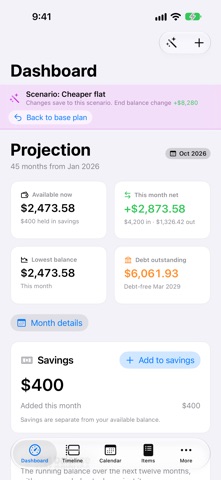
Edit inside a scenario. With a scenario selected, your changes to items, goals, single months and extra payments are saved to that scenario. A strip at the top of every page shows which one you're in, with a one-tap way back. Your base plan still flows through. A raise you add to the base plan reaches every scenario, unless a scenario changed that same detail. Real news while you're in a scenario? Turn on Apply to base plan. Leave goals out of a scenario. Switch a goal off in a scenario, like a house deposit in the one where you buy with a mortgage, and its savings stop counting there. Pick payment dates from a calendar. Choose an item's first payment on a calendar, and type a loan or installment term instead of tapping through it.
Screenshots


About
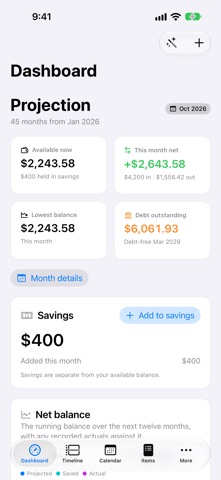
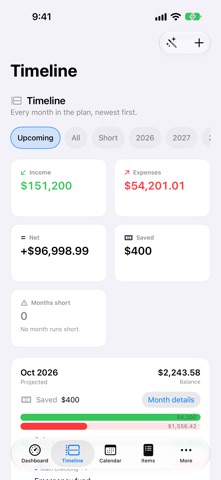
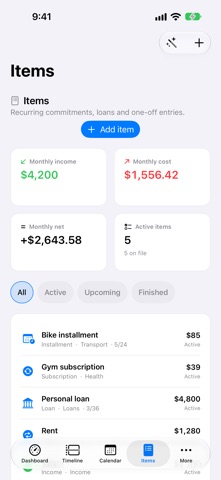
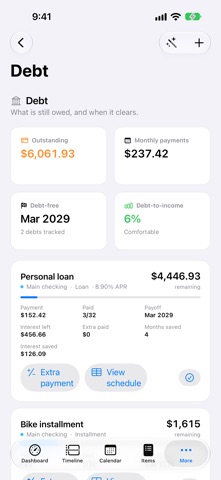
Clink Clink plans your money forward rather than filing away what you already spent. Put in what comes in and what goes out, and it projects every month ahead — so a month that runs short is something you see coming, not something you discover. • Dashboard — the running balance over the next twelve months, with the balances you actually recorded laid over it. • Timeline — a month-by-month ledger of what lands, when, and what it leaves behind. • Items — income, rent, subscriptions, instalments, loans, one-offs and transfers, with dated amount changes for a rent rise or a raise. • Debt — what is still owed and when it clears, plus extra payments that show what each one buys in months and interest. • Goals and budgets — targets measured against the projection, and limits checked before you reach the month. • Scenarios — branch the plan to try something without touching the original. • Backups — snapshots kept inside the app, on a cadence you choose, with one tap to restore. Your plan syncs across iPhone, iPad and Mac through your own iCloud account. There is no Clink Clink account, no server of ours, and no tracking. Records sync per item, so edits from two devices merge instead of one overwriting the other. Nine languages: English, Spanish, French, German, Portuguese, Italian, Japanese, Korean and Simplified Chinese.
What's new · 1.4
Edit inside a scenario. With a scenario selected, your changes to items, goals, single months and extra payments are saved to that scenario. A strip at the top of every page shows which one you're in, with a one-tap way back. Your base plan still flows through. A raise you add to the base plan reaches every scenario, unless a scenario changed that same detail. Real news while you're in a scenario? Turn on Apply to base plan. Leave goals out of a scenario. Switch a goal off in a scenario, like a house deposit in the one where you buy with a mortgage, and its savings stop counting there. Pick payment dates from a calendar. Choose an item's first payment on a calendar, and type a loan or installment term instead of tapping through it.
Details