

Check - シンプルなToDo
forYou inc. · Productivity
Independent analytics for this App Store listing. AppTracker is not affiliated with forYou inc.
Chart standing · US
What changed · US
Listing changes AppTracker has observed for this app in this storefront — new versions, price moves, rating shifts, and store copy.
• iPhone Duo support. When open, the sidebar, your list and task details appear side by side, and everything works on the outer screen when closed • Siri and Shortcuts support. Say "Add to Check" to add a task, or ask for today's tasks or what's next, and mark tasks done. You can also find tasks from Spotlight • Add "New Task" and "Today" buttons to Control Center and the Lock Screen • URL scheme (check://add). Add tasks directly from other apps or AI tools • URLs and phone numbers in notes are now links — tap to open or call • Paste multiple lines into "Add Step" to add each line as its own step • Tasks you add with "+" now appear at the top of the list • Smaller fixes and improvements
In-app purchases · US
What this app sells inside itself, grouped by kind and priced for this storefront.
Screenshots




About
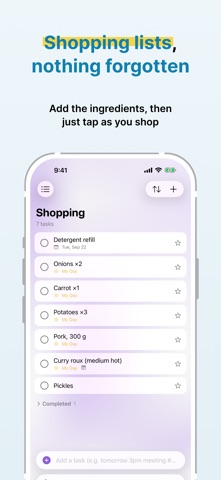
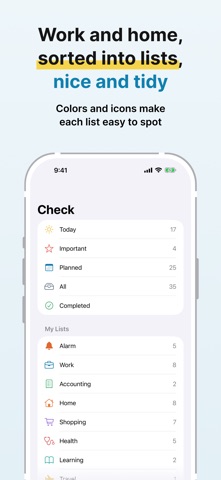
Check is a simple to-do app for focusing on what you have to do today. The same tasks sync across Mac, iPhone and iPad through iCloud. ■ Type it the way you say it Write "tomorrow 3pm meeting !! #work 30 min before" and Check sets the due date, time, priority, list and alarm all at once. ■ Focus on today Today shows tasks due today plus anything you add to My Day. Organize the rest with the Important, Planned, All and Completed smart lists, and with your own lists — each with its own color and icon. ■ Never forget Alarms (with sound) and notifications (a quiet banner) are set separately. Choose a specific time, or 5 minutes to 1 week before the due time — or use both. Pick one of three alarm sounds and a snooze interval per task. From a notification you can complete the task or be reminded later. ■ Keep the details Steps (subtasks), notes, priority, and repeats — every day, weekdays, every week, every 2 weeks, every month, every year, or a custom rule such as the 25th of every month, the last day of the month, every 3 months, or every 2 weeks on Mon and Wed. Drag and drop to reorder or move between lists. ■ Widgets Today's tasks, upcoming alarms, today's progress, and any list — on your Home Screen, desktop or Lock Screen. Complete a task right from the widget. ■ Made for Mac Keep a small window on your desktop, float it in front of other apps, check today's tasks from the menu bar, and use keyboard shortcuts throughout. ■ Privacy Your tasks are stored only on your devices and in your private iCloud database. No ads, no analytics. ■ Pricing Check Pro is an auto-renewing subscription with a 1-week free trial (monthly or yearly). One subscription covers Mac, iPhone and iPad. It renews automatically unless you cancel at least 24 hours before the free period ends, and you can manage or cancel it anytime in your Apple Account settings. Terms of Use: https://www.apple.com/legal/internet-services/itunes/dev/stdeula/ Privacy Policy: https://uuuu.to/check-privacy-policy/
What's new · 1.5
• iPhone Duo support. When open, the sidebar, your list and task details appear side by side, and everything works on the outer screen when closed • Siri and Shortcuts support. Say "Add to Check" to add a task, or ask for today's tasks or what's next, and mark tasks done. You can also find tasks from Spotlight • Add "New Task" and "Today" buttons to Control Center and the Lock Screen • URL scheme (check://add). Add tasks directly from other apps or AI tools • URLs and phone numbers in notes are now links — tap to open or call • Paste multiple lines into "Add Step" to add each line as its own step • Tasks you add with "+" now appear at the top of the list • Smaller fixes and improvements
Details