

FastTrack Timer
Michael Surratt · Utilities
Independent analytics for this App Store listing. AppTracker is not affiliated with Michael Surratt.
Chart standing · US
What changed · US
Listing changes AppTracker has observed for this app in this storefront — new versions, price moves, rating shifts, and store copy.
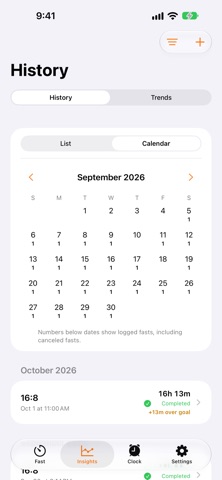
A big polish update for FastTrack. TIMER • A bigger, clearer countdown ring. Tap it to switch between time remaining and time elapsed. • Smoother, steadier countdown that keeps counting accurately. • A gentle celebration the moment you reach your goal. • Stages now have plain-English names, and each tip can be dismissed. • Cancel Fast has moved into the ⋯ menu so it's harder to hit by accident. • A short safety check before very long fasts. EATING WINDOW • See how long ago your eating window ended. • Windows left open for a day close themselves. • Reminder notifications now have "Start Next Fast" and "Remind Me in 15 Min" buttons. STREAKS & INSIGHTS • Streaks now work for overnight fasts and keep going while today's fast is still running. • Planned rest days pause your streak instead of breaking it. • A color-coded History calendar, plus a quick "Log a Fast" from an empty History. • A plain-language takeaway at the top of Trends. • History and Trends appear side by side on iPad. CLOCK • Alarms and Timers appear side by side on iPad. • A simpler alarm editor with a clear Repeat screen and full day names. • Search for alarms and timers. • Clearer messages when an alarm can't be scheduled. SETTINGS • Reminders and alerts are combined into one screen. • New Help & Feedback, with a privacy summary and a link to our Privacy Policy. • Clearer iCloud sync status, including when iCloud isn't available. • A simplified Tab Bar and a cleaner Widgets & Live Activities screen. WIDGETS & LIVE ACTIVITIES • A tidier Dynamic Island with a compact progress ring and countdown. • Choose when the Live Activity appears: as soon as a fast starts, or at a milestone. FIXES & RELIABILITY • More reliable history saving and syncing between the app and widgets. • Fewer unnecessary updates, for better battery life. • Friendlier purchase and error messages. • Many small fixes and improvements.
In-app purchases · US
What this app sells inside itself, grouped by kind and priced for this storefront.
Screenshots





About
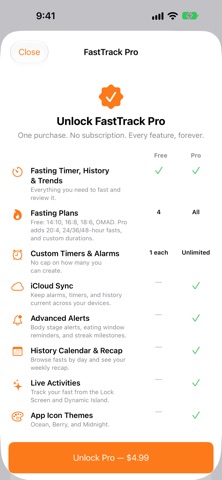
FastTrack Timer — Fasting Timer & Tracker Take the guesswork out of intermittent fasting. FastTrack keeps your fasting window, your eating window, and your streak all in one clean, glanceable timer — with Live Activities, widgets, and reminders that keep you on track without opening the app. Fast With a Plan • Choose from popular protocols (16:8, 18:6, 20:4, OMAD, and more) or build your own custom schedule • One-tap Quick Start using your last protocol • Pause and resume anytime without losing progress See Exactly Where You Are • A live progress ring shows your current fasting stage — from early fat-burning through ketosis and autophagy • Body Stage Alerts notify you the moment you cross into a new stage • Track your eating window right alongside your fast, with a reminder before it closes Stay On Track, Automatically • Live Activities and Dynamic Island support — watch your fast count down without unlocking your phone • Home Screen widgets for your fast, your streak, alarms, and custom timers • A smart alarm fires the moment your fast is complete Build the Habit • Daily streaks and a weekly consistency view • Full fasting history with trends over time • Milestone notifications to celebrate your streaks More Than a Fasting Timer • A built-in alarm clock, right alongside your fasting schedule • Custom timers for anything else you need to track • iCloud sync keeps your alarms, timers, and history up to date across all your devices • Personalize your Home Screen icon with Ocean, Berry, and Midnight themes Simple, focused, and built to fit into your day — download FastTrack and start your next fast in seconds.
What's new · 1.7
A big polish update for FastTrack. TIMER • A bigger, clearer countdown ring. Tap it to switch between time remaining and time elapsed. • Smoother, steadier countdown that keeps counting accurately. • A gentle celebration the moment you reach your goal. • Stages now have plain-English names, and each tip can be dismissed. • Cancel Fast has moved into the ⋯ menu so it's harder to hit by accident. • A short safety check before very long fasts. EATING WINDOW • See how long ago your eating window ended. • Windows left open for a day close themselves. • Reminder notifications now have "Start Next Fast" and "Remind Me in 15 Min" buttons. STREAKS & INSIGHTS • Streaks now work for overnight fasts and keep going while today's fast is still running. • Planned rest days pause your streak instead of breaking it. • A color-coded History calendar, plus a quick "Log a Fast" from an empty History. • A plain-language takeaway at the top of Trends. • History and Trends appear side by side on iPad. CLOCK • Alarms and Timers appear side by side on iPad. • A simpler alarm editor with a clear Repeat screen and full day names. • Search for alarms and timers. • Clearer messages when an alarm can't be scheduled. SETTINGS • Reminders and alerts are combined into one screen. • New Help & Feedback, with a privacy summary and a link to our Privacy Policy. • Clearer iCloud sync status, including when iCloud isn't available. • A simplified Tab Bar and a cleaner Widgets & Live Activities screen. WIDGETS & LIVE ACTIVITIES • A tidier Dynamic Island with a compact progress ring and countdown. • Choose when the Live Activity appears: as soon as a fast starts, or at a milestone. FIXES & RELIABILITY • More reliable history saving and syncing between the app and widgets. • Fewer unnecessary updates, for better battery life. • Friendlier purchase and error messages. • Many small fixes and improvements.
Details