

Husk: Screenshot Cleanup
Juyeon Yu · Productivity
Independent analytics for this App Store listing. AppTracker is not affiliated with Juyeon Yu.
Chart standing · US
In-app purchases · US
What this app sells inside itself, grouped by kind and priced for this storefront.
Screenshots



About
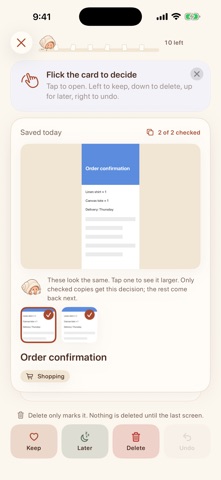
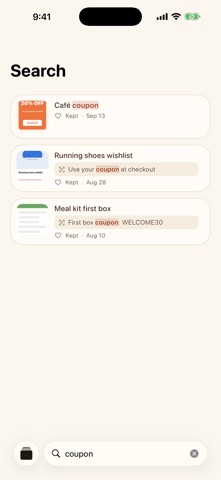
Save now. Decide later. You take a screenshot to deal with it later. You send yourself a link to read later. Later rarely comes, and the pile keeps growing. Husk brings those things back and asks one small question about each one: still need it? ONE CARD AT A TIME • Delete it, keep it, archive it, or leave it for later • Swipe left to keep, down to delete, up for later, or just tap a button • Near-identical screenshots arrive together as one card • When you finish, deleted screenshots leave your Photos library too, after one confirmation, and Husk shows how much space you got back NOTHING TO SET UP • Screenshots come in on their own. Keep taking them the way you already do. • Links, text and images come in from the share sheet, Shortcuts or Siri • Anything you saved in the last two days comes first, so new things never get buried IT BRINGS BACK WHAT YOU FORGOT • A daily reminder when things are waiting, and another when something has sat untouched for a month • Every so often, something from long ago comes back: "Remember this?" • A home screen widget shows one forgotten thing at a time FINISH IT, THEN LET IT GO • Tap an address, phone number or link inside a screenshot with Live Text • Coupons and events with a date suggest coming back before they expire • What you keep is sorted into categories for you, and you can search it STAYS ON YOUR IPHONE • Your screenshots never leave your iPhone. Reading the text in them and sorting them happens on device. • No account. No ads. No tracking. Every feature is free. An optional Theme Pack changes how Husk looks, and tips help support the app.
What's new · 1.1
Husk tidied up a little inside its shell. We fixed the small snags you might have run into, so everything feels a bit smoother now.
Details