

DeskPort
尔昊 毛 · Productivity
Independent analytics for this App Store listing. AppTracker is not affiliated with 尔昊 毛.
Chart standing · US
What changed · US
Listing changes AppTracker has observed for this app in this storefront — new versions, price moves, rating shifts, and store copy.
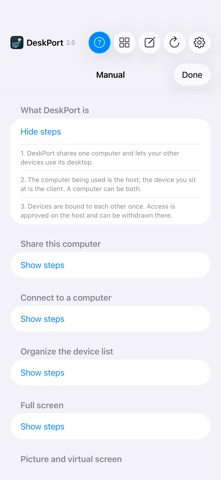
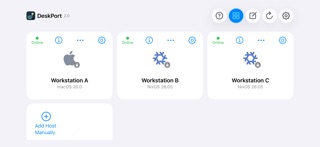
Version 2.2 adds QR invitation binding with identity confirmation and clearer connection recovery. DeskPort now prefers HEVC when supported and automatically selects a compatible video codec. Device cards, floating panels and the built-in manual share a refined appearance. Includes privacy explanations and connection reliability improvements.
Screenshots


Similar apps
Competitors and close alternatives, as estimated by AppTracker.



About
Your computer, ready on your iPad or iPhone. DeskPort brings your own computer's desktop and audio to your mobile screen. Use desktop applications with touch, a keyboard or a mouse. INSTALL THE FREE DESKTOP COMPANION FIRST This app requires the free, open-source DeskPort desktop app. Download a host-capable package from: https://github.com/keithxc/deskport/releases/latest Enable Sharing on the computer. For initial setup, connect both devices to the same local network, allow Local Network access on iPad/iPhone, and approve the device request on the computer. Keep the computer awake. The Linux Flatpak is client-only and cannot share a desktop. YOUR COMPUTERS, ORGANIZED Discover computers on your local network or add an address. Give saved computers local nicknames, arrange your device list and keep separate picture, audio, input and desktop preferences for each computer. A WORKSPACE THAT FITS View your desktop in portrait or landscape. Compatible hosts can adapt the remote workspace to the client size. Mirror, extended and exclusive display behavior depends on the host, operating system and driver. Choose fullscreen per computer. CONTROLS FOR DESKTOP WORK Use direct touch or trackpad mode, an external keyboard or pointer, and on-screen modifier and navigation keys. Reach devices, settings and the built-in manual from the navigation bar. Confirm before taking over another active client session. Disconnecting does not shut down the computer. English, Simplified Chinese, Traditional Chinese and Japanese interfaces are included. DeskPort desktop is required; standalone, unmodified Sunshine hosts are not supported. Features depend on the host package, device and connected accessories. No DeskPort account, cloud computer, relay or VPN service is included. Access outside your local network requires a reachable private network or VPN that you configure. Setup and support: https://keithxc.github.io/deskport/support.html
What's new · 2.2
Version 2.2 adds QR invitation binding with identity confirmation and clearer connection recovery. DeskPort now prefers HEVC when supported and automatically selects a compatible video codec. Device cards, floating panels and the built-in manual share a refined appearance. Includes privacy explanations and connection reliability improvements.
Details