

Dental CBCT Studio
Chris Gupta · Medical
Independent analytics for this App Store listing. AppTracker is not affiliated with Chris Gupta.
Chart standing · US
What changed · US
Listing changes AppTracker has observed for this app in this storefront — new versions, price moves, rating shifts, and store copy.
• New experimental Endo workspace: select a tooth region, review local tooth and pulp predictions, refine masks, record manual canal paths and notes, and export reviewed surfaces. • Optional on-device Super Resolution and Metal Artifact Reduction previews across MPR, tooth slices, and simulated panoramas, with instant Show Original comparison. Endo editing always displays the acquired source slice. • Export a separate processed CT copy while retaining the original scan and source geometry. Processed grayscale is not calibrated HU. • Improved DICOM loading and spatial validation, cross-section sampling, source-slice mask editing, and memory handling when opening and closing studies. • More reliable state restoration, 3D surfaces, image/video/PDF exports, and mobile layouts. Saved states never restore export approval. These features are experimental and have not been validated for diagnosis or treatment decisions.
Screenshots
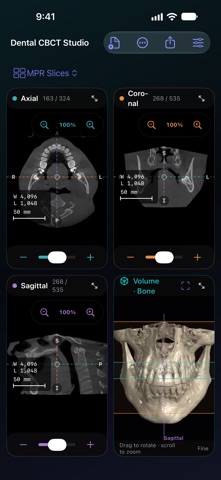


About
Review dental CBCT studies with synchronized slices, 3D views, panoramas, measurements, and exports on iPhone, iPad, and Apple-silicon Mac. • Move through your scan. Review axial, coronal, and sagittal slices alongside the 3D volume. On iPhone and iPad, pinch and pan with two fingers in Navigate mode. • Follow the dental arch. Review and adjust automatic upper and lower arch proposals, or draw your own. Inspect curved panoramas and move through perpendicular cross-sections. Optional panorama guides locate cross-section drawings and reopen their source sections; measurement values stay in the source view. The guides are not panorama rulers. • Add measurements and observations. Place distances, angles, and regions of interest using the study's physical geometry. Explicitly save a study state with views, annotations, and accepted edits to reopen with the matching original study. • Inspect and refine surfaces. Review jaw, grouped tooth, and mandibular canal (IAN) segmentation proposals against the source slices. Paint or erase corrections and export STL surfaces after reviewing them. A general threshold surface is also available. • Review a selected tooth. The experimental Endo workspace runs its bundled STSR26 tooth-and-pulp model locally. Compare and edit masks against the acquired slices, record manual canal traces and notes, and export separate reviewed surfaces. Manual trace length is not established clinical working length. • Compare optional enhanced previews. Apply Super Resolution or Metal Artifact Reduction to current 2D views, then use Show Original for the same-cut comparison. A separate Export Enhanced CT action writes a processed DICOM copy; retain the original for comparison. • Prepare clear exports. Create still images, silent videos, PDF reports, and DICOM secondary captures. Choose the views and overlays to include, preview your work, and save it through system controls. Open a local DICOM file or folder and work on your device. No account is required. Help, privacy information, and licenses are available offline. Find public app instructions through the in-app guide, Siri, Shortcuts, and supported Spotlight search; private studies are excluded. The feedback form prepares a draft for your email app with your description and app/OS information. You review and send it; no study files or crash logs are attached automatically. The importer supports monochrome 8-bit or 16-bit integer DICOM series and Enhanced multi-frame files with valid geometry. Supported transfer syntaxes are Implicit VR Little Endian, Explicit VR Little Endian, Explicit VR Big Endian, Deflated Explicit VR Little Endian, and RLE Lossless. Multi-frame geometry must describe a regular spatial stack; single-frame files need declared slice extent. JPEG, JPEG-LS, JPEG 2000, other compressed transfer syntaxes, color DICOM, and PACS networking are not supported. Scan size and device memory affect what can be opened. Dental CBCT Studio has not been validated for diagnostic use. Verify measurements, arch proposals, and segmentation against the original study. Segmentation and enhancement can be incomplete or incorrect, including missed or altered fine canals and anatomy. A denser image grid does not establish improved diagnostic resolution, and CBCT gray values are not standardized Hounsfield units. Use qualified clinical judgment before making medical decisions. Includes experimental STSR26, BoneEnhance, and RISE-MAR adaptations with source, license, and modification notices available offline in Privacy & Licenses. Includes an adapted DentalSegmentator model by Gauthier Dot and contributors, licensed CC BY 4.0. Original model: https://zenodo.org/records/10829675. License: https://creativecommons.org/licenses/by/4.0/. Full credits, modifications, and separate Apache-2.0 code notices are available in Privacy & Licenses.
What's new · 1.0
• New experimental Endo workspace: select a tooth region, review local tooth and pulp predictions, refine masks, record manual canal paths and notes, and export reviewed surfaces. • Optional on-device Super Resolution and Metal Artifact Reduction previews across MPR, tooth slices, and simulated panoramas, with instant Show Original comparison. Endo editing always displays the acquired source slice. • Export a separate processed CT copy while retaining the original scan and source geometry. Processed grayscale is not calibrated HU. • Improved DICOM loading and spatial validation, cross-section sampling, source-slice mask editing, and memory handling when opening and closing studies. • More reliable state restoration, 3D surfaces, image/video/PDF exports, and mobile layouts. Saved states never restore export approval. These features are experimental and have not been validated for diagnosis or treatment decisions.
Details