

LockDay: To-Do List & Planner
Dat Pham · Productivity
Independent analytics for this App Store listing. AppTracker is not affiliated with Dat Pham.
Chart standing · US
What changed · US
Listing changes AppTracker has observed for this app in this storefront — new versions, price moves, rating shifts, and store copy.
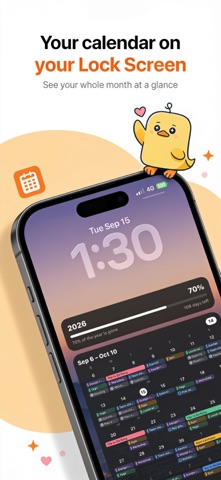
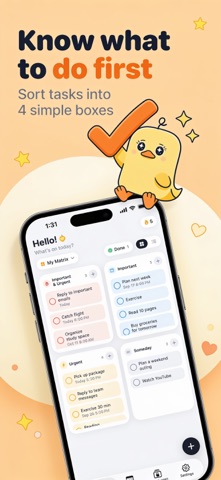
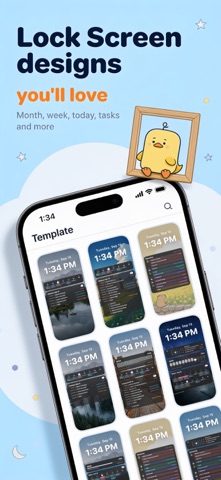
LockDay turns your to-do list and calendar into your Lock Screen. • See your tasks, events and month calendar right on your Lock Screen, no unlocking needed. • Sort tasks with the Eisenhower Matrix: important, urgent, or someday. • Mix and match components: month calendar, week, today's timeline, upcoming, checklist, year progress, countdown, notes and more. • Ready-made templates, photo backgrounds and full control over colors, fonts and layout. • After a one-time Shortcuts setup, your Lock Screen updates by itself. • Home Screen and Lock Screen widgets, reminders and your iPhone calendars, all in one place.
Price & rating history · US
Reconstructed from the listing changes AppTracker has observed in this storefront. A field is charted once it has changed more than once, and each line starts at the value it moved from.
Average rating · ★ 4.87 now · 7 changes on record
Ratings breakdown · US
The star breakdown behind this app's rating in this storefront.
In-app purchases · US
What this app sells inside itself, grouped by kind and priced for this storefront.
Screenshots



Similar apps
Competitors and close alternatives, as estimated by AppTracker.
 Ink: Lockscreen Calendar, Note
SilverAI Joint Stock Company
Ink: Lockscreen Calendar, Note
SilverAI Joint Stock Company
 TaskCard: Schedule & Tasks
Cihat Salik
TaskCard: Schedule & Tasks
Cihat Salik
 Yondo Todo List on Lock Screen
Ryunosuke Nagase
Yondo Todo List on Lock Screen
Ryunosuke Nagase
 AnySchedule - Calendar & Todo
ReleCompany
AnySchedule - Calendar & Todo
ReleCompany
 ToDo List - Task manager list
Komorebi Inc.
ToDo List - Task manager list
Komorebi Inc.
 LockScreenNotes
Takumi Banjoya
LockScreenNotes
Takumi Banjoya
 LockWidget - LockScreen Themes
SoCloud Technology Co., Limited
LockWidget - LockScreen Themes
SoCloud Technology Co., Limited
 DayBuilder - Design Your Day
Alex Yasinskiy
DayBuilder - Design Your Day
Alex Yasinskiy
About
Your whole day, right on your Lock Screen. LockDay turns your to-dos, calendar and notes into a Lock Screen that updates itself. Pick up your phone and you already know what's next. — PRIORITIES FIRST Sort tasks by importance and urgency in a simple four-box matrix. The tasks that matter stay in view. — CALENDAR + TASKS See events from your iPhone calendars next to your tasks: week strip, month view and today's timeline. — A LOCK SCREEN THAT UPDATES ITSELF Pick a template, choose what to show and add your own photo. A quick one-time Shortcuts setup keeps it fresh. — NOTES & WIDGETS Pin a note or checklist to your Lock Screen. Widgets for your Home Screen and Lock Screen. — PRIVATE BY DESIGN No account, no ads, no tracking. Your data stays on your device or in your own iCloud. LockDay Pro unlocks every template and style, unlimited tasks and notes, repeating tasks and iCloud sync. Subscriptions renew automatically unless cancelled at least 24 hours before the end of the current period. Manage or cancel anytime in your Apple Account settings. Terms of Use: https://lockday.xyz/terms/ Privacy Policy: https://lockday.xyz/privacy/
What's new · 1.9.0
LockDay turns your to-do list and calendar into your Lock Screen. • See your tasks, events and month calendar right on your Lock Screen, no unlocking needed. • Sort tasks with the Eisenhower Matrix: important, urgent, or someday. • Mix and match components: month calendar, week, today's timeline, upcoming, checklist, year progress, countdown, notes and more. • Ready-made templates, photo backgrounds and full control over colors, fonts and layout. • After a one-time Shortcuts setup, your Lock Screen updates by itself. • Home Screen and Lock Screen widgets, reminders and your iPhone calendars, all in one place.
Details