

Cuspart: Prompter
Mustafa Tolga DALBUDAK · Productivity
Independent analytics for this App Store listing. AppTracker is not affiliated with Mustafa Tolga DALBUDAK.
Chart standing · US
Screenshots





About
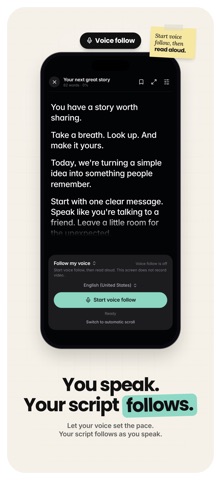
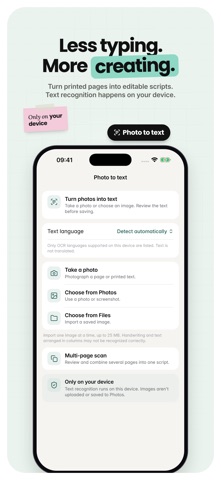
Put your words on screen and your message on camera. Cuspart: Prompter is a teleprompter that lets you record video while reading your script, whether you're filming a tutorial, preparing a presentation, or sharing an update. PREPARE YOUR SCRIPT Write and edit in the app, import TXT, RTF, DOCX, PDF, CSV, or TSV files, or extract text from a photo with text recognition. Scan multi-page documents to bring longer scripts together. READ AND RECORD Adjust the font, text size, alignment, and scrolling speed to suit your delivery. Scroll automatically or move through the text manually, mirror the script for your setup, and keep your takes in the recordings library. Let scrolling follow your voice or set a target reading duration. Text scrolling supports up to 120 Hz on compatible displays; this refers to scrolling, not video frame rate. Record video in up to 4K on supported devices. FINISH YOUR VIDEO Generate captions, review the wording, choose a style, and burn subtitles into your video. Export an SRT file when you need captions separately. Add a logo or custom background, shorten pauses, and export in 9:16, 16:9, or 1:1 for your chosen social format. ORGANIZE AND CONNECT Arrange scripts in ordered shoot lists and sync scripts, shoot lists, and videos with iCloud. Use the browser reader, read full screen on a compatible external display, control reading remotely, or share content between devices. Choose from 11 additional app icons. Feature availability depends on your device and setup. Speech and photo text recognition depend on supported device languages. SUBSCRIPTIONS Script writing and editing, file and photo imports, reader adjustments, mirroring, basic camera recording, and the recordings library are free. Videos recorded with the free version include a small watermark; the classic app icon is included. A subscription is required for voice-following scrolling, target-duration mode, up to 120 Hz scrolling and 4K recording on supported hardware, caption creation and SRT export, logos and custom backgrounds, pause shortening, social-format exports, multi-page scanning, shoot lists, iCloud sync, browser and external-display reading, remote control, device sharing, watermark removal, and 11 additional app icons. Pro is available through weekly, monthly, and yearly auto-renewable plans offered in the app. Only the yearly plan offers a 3-day free trial for eligible customers where available. Unless canceled, the trial converts to a yearly subscription at the price shown before confirmation. Weekly and monthly plans do not include this trial. Paid purchases are charged to your Apple Account on confirmation; trial subscriptions are charged after the trial ends. Subscriptions renew automatically unless canceled at least 24 hours before the current period or trial ends. Renewal is charged within 24 hours before the current period ends. Manage or cancel in your Apple Account subscription settings. Canceling a paid subscription leaves Pro available for the rest of the paid period. Free features remain when Pro access ends. Privacy Policy: https://www.cuspart.com/privacy-policy-cuspart-prompter/ Terms of Use: https://www.cuspart.com/terms-of-use-cuspart-prompter/ EULA: https://www.apple.com/legal/internet-services/itunes/dev/stdeula/
Details