

RenterVault: Home Inventory
David Long · Finance
Independent analytics for this App Store listing. AppTracker is not affiliated with David Long.
Chart standing · US
What changed · US
Listing changes AppTracker has observed for this app in this storefront — new versions, price moves, rating shifts, and store copy.
RenterVault 2.2 keeps your inventory safe in your own iCloud, makes documenting a home much faster, and puts Apple Intelligence to work, on your device and, when you allow it, with Apple's Private Cloud Compute. YOUR LIBRARY IN ICLOUD - Back up to iCloud with one tap, and RenterVault makes a fresh backup every week on its own. Backups sit in iCloud Drive > RenterVault, where the Files app and Finder can copy them anywhere. - New phone? Sign in with the same Apple Account and RenterVault greets you with your belongings, photos and documents, or tells you exactly what to switch on. - Restore any backup from any of your devices. - Settings shows what iCloud holds, when it last synced and which devices share your library. - Much more careful syncing: a slow iCloud no longer freezes the app, and a device that is offline or out of date can no longer undo changes made elsewhere. DOCUMENT A ROOM - Walk a room with the camera: each photo becomes a belonging, named and filled in from what RenterVault reads, with a running total as you go. On the Mac, drop in a folder of photos. WIDGETS - Coverage on your Home Screen, Lock Screen and Mac desktop, with an Add item button. A GENTLE START - A short introduction on first launch, and an optional yearly reminder to walk your home and add anything new. PHOTO READING - Serial labels, receipts and barcodes fill in serial, model, brand, store, total and date. Only empty fields are filled, and a smudged lens is caught before anything is read (iOS 26 and macOS 26 or later). APPLE INTELLIGENCE - Checked answers: every figure Ask gives is checked against your library before you see it, "How I worked it out" shows what it looked up, and Stop ends a long answer. - Read your policy: fill in your insurer, policy number, limit and deductible from a photo or PDF of the declarations page. With Pro, see how losses are paid, special limits and exclusions with the page each comes from, get a warning when your belongings pass a limit, and ask questions answered in the policy's own words. - Receipt lines: on a receipt with several things, pick the right line and the value includes its share of the tax. With Pro, PDF receipts work in Documents and the other things on a receipt become new items. - Room scan (Pro; iOS 27 and macOS 27): one photo of a room becomes a checklist of the belongings in it, marking anything already in your library. - Check before you file: a list of what to fix before you send a claim. With Pro, a second look at values and duplicates. - A brand is filled in only when it is printed on the label. - Optional Private Cloud Compute: with Pro, a bigger question, a question about your policy, a whole policy or the second look can go to Apple's Private Cloud Compute, and on any plan so can a declarations page your device can't read (its text can include the names, address and policy number printed on it). RenterVault asks first unless you choose otherwise in RenterVault's Settings > Apple Intelligence, replaces the name, address and policy number in your policy details where they're written the same way, and never sees what is sent. These need a device with Apple Intelligence turned on. Photos, labels, receipts and room photos are always read on your device; exact questions still work everywhere. SPOTLIGHT AND SIRI - Find belongings, rooms and documents in Spotlight, and use Siri to add a belonging, add a receipt, ask how much coverage you have left or open your claim report. ALSO - Add a roommate or partner who shares your policy; both names print on the claim report. - Drag photos into order and choose the cover photo; redeem offer codes; backup progress; a tidier iPhone toolbar on iOS 26 and 27. Everything still lives on your devices and in your own iCloud Drive, except what you choose to send to Apple's Private Cloud Compute.
Screenshots



About
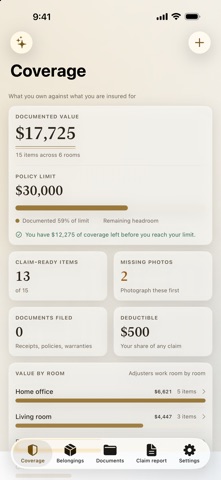
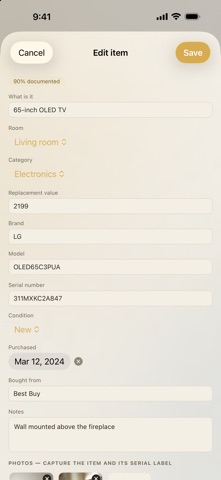
Your renters insurance pays out on what you can prove you owned. After a fire or a burglary, most people are trying to remember what was in a room from memory. RenterVault is where you write it down first. DOCUMENT A ROOM IN MINUTES Add an item, photograph it, capture the serial number label in a second shot, and note what you paid. RenterVault tracks brand, model, serial, condition, purchase date and where you bought it — the exact fields an adjuster asks for. ONE LIBRARY ON EVERY DEVICE Photograph on your iPhone, review on your iPad, print from your Mac. Your library syncs through your own iCloud Drive, so nothing is typed twice and nothing passes through a server we run. KNOW WHERE YOU STAND Set your policy's personal property limit and RenterVault shows what you have documented against it. If your belongings have outgrown your coverage, you find out now, not during a claim. CLAIM-READY SCORING Every item gets a readiness score based on whether it has photos, a serial number, a value, a purchase date and a receipt on file. Sort by least documented and fix the gaps in an afternoon. PRINT A SCHEDULE OF LOSS One tap produces an itemized proof-of-loss schedule with your policy details, every item, its serial number and its value, totaled and dated. Print it, save it as a PDF, or share it straight to your insurer. KEEP THE PAPERWORK TOO Store your policy declarations, receipts, warranties and appraisals in the app alongside the items they cover. APPLE INTELLIGENCE On a Mac, iPhone or iPad with Apple Intelligence, RenterVault does more of the work. Photos are always read on your device: - Ask in your own words, such as "what would I lose if the kitchen flooded?", and every figure in the answer is checked against your library first. - Fill in your policy details from a photo or PDF of your declarations page. - With Pro, read your whole policy: how losses are paid, special limits and exclusions, each with the page it comes from, and a warning when what you have documented passes a limit. - Pick the right line on a receipt with several things on it; the value includes that line's share of the tax. - Check before you file: what to fix before you send a claim, and with Pro a second look at values and duplicates. - With Pro, one photo of a room becomes a checklist of the belongings in it. - If you allow it, Apple's Private Cloud Compute can take bigger questions, policy questions, your policy and the second look (Pro), and a declarations page your device can't read (any plan). The name, address and policy number in your policy details are replaced where written the same way; a declarations page can include them as printed. Exact questions, such as "how much coverage do I have left?", work on every device. NO ACCOUNT, NO SERVER OF OURS Your inventory, photos and documents live on your devices and in your own iCloud Drive. Photos are always read on your device. Only if you allow it, some questions, your policy and the second look can go to Apple's Private Cloud Compute; we never receive them. Export a full backup whenever you want. FREE AND PRO Free documents 15 items with one photo each. RenterVault Pro removes every limit and adds up to 12 photos per item, the document vault with PDF receipts, printable claim reports, full backups and CSV export, plus policy reading, room photo checklists, a second look before you file, and bigger questions answered with Apple's Private Cloud Compute. One purchase unlocks Mac, iPhone and iPad. RenterVault Pro is available monthly, yearly, or as a one-time lifetime purchase. No subscription required if you'd rather own it. RenterVault is a record-keeping tool. It is not insurance and does not guarantee any claim outcome. Confirm your coverage with your insurer. Terms of Use (EULA): https://www.apple.com/legal/internet-services/itunes/dev/stdeula/ RenterVault terms: https://app-developments.com/rentervault/terms.html Privacy Policy: https://app-developments.com/rentervault/privacy.html
What's new · 2.2.0
RenterVault 2.2 keeps your inventory safe in your own iCloud, makes documenting a home much faster, and puts Apple Intelligence to work, on your device and, when you allow it, with Apple's Private Cloud Compute. YOUR LIBRARY IN ICLOUD - Back up to iCloud with one tap, and RenterVault makes a fresh backup every week on its own. Backups sit in iCloud Drive > RenterVault, where the Files app and Finder can copy them anywhere. - New phone? Sign in with the same Apple Account and RenterVault greets you with your belongings, photos and documents, or tells you exactly what to switch on. - Restore any backup from any of your devices. - Settings shows what iCloud holds, when it last synced and which devices share your library. - Much more careful syncing: a slow iCloud no longer freezes the app, and a device that is offline or out of date can no longer undo changes made elsewhere. DOCUMENT A ROOM - Walk a room with the camera: each photo becomes a belonging, named and filled in from what RenterVault reads, with a running total as you go. On the Mac, drop in a folder of photos. WIDGETS - Coverage on your Home Screen, Lock Screen and Mac desktop, with an Add item button. A GENTLE START - A short introduction on first launch, and an optional yearly reminder to walk your home and add anything new. PHOTO READING - Serial labels, receipts and barcodes fill in serial, model, brand, store, total and date. Only empty fields are filled, and a smudged lens is caught before anything is read (iOS 26 and macOS 26 or later). APPLE INTELLIGENCE - Checked answers: every figure Ask gives is checked against your library before you see it, "How I worked it out" shows what it looked up, and Stop ends a long answer. - Read your policy: fill in your insurer, policy number, limit and deductible from a photo or PDF of the declarations page. With Pro, see how losses are paid, special limits and exclusions with the page each comes from, get a warning when your belongings pass a limit, and ask questions answered in the policy's own words. - Receipt lines: on a receipt with several things, pick the right line and the value includes its share of the tax. With Pro, PDF receipts work in Documents and the other things on a receipt become new items. - Room scan (Pro; iOS 27 and macOS 27): one photo of a room becomes a checklist of the belongings in it, marking anything already in your library. - Check before you file: a list of what to fix before you send a claim. With Pro, a second look at values and duplicates. - A brand is filled in only when it is printed on the label. - Optional Private Cloud Compute: with Pro, a bigger question, a question about your policy, a whole policy or the second look can go to Apple's Private Cloud Compute, and on any plan so can a declarations page your device can't read (its text can include the names, address and policy number printed on it). RenterVault asks first unless you choose otherwise in RenterVault's Settings > Apple Intelligence, replaces the name, address and policy number in your policy details where they're written the same way, and never sees what is sent. These need a device with Apple Intelligence turned on. Photos, labels, receipts and room photos are always read on your device; exact questions still work everywhere. SPOTLIGHT AND SIRI - Find belongings, rooms and documents in Spotlight, and use Siri to add a belonging, add a receipt, ask how much coverage you have left or open your claim report. ALSO - Add a roommate or partner who shares your policy; both names print on the claim report. - Drag photos into order and choose the cover photo; redeem offer codes; backup progress; a tidier iPhone toolbar on iOS 26 and 27. Everything still lives on your devices and in your own iCloud Drive, except what you choose to send to Apple's Private Cloud Compute.
Details