

Dictator: Voice to Text
Jeremy Irons · Productivity
Independent analytics for this App Store listing. AppTracker is not affiliated with Jeremy Irons.
Chart standing · US
What changed · US
Listing changes AppTracker has observed for this app in this storefront — new versions, price moves, rating shifts, and store copy.
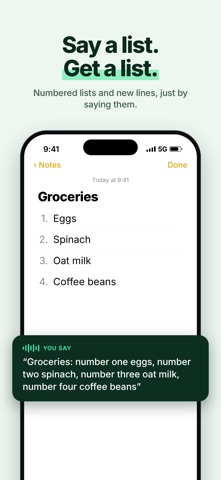
• Meetings: record or import a meeting, get a transcript, notes, action items, and ask questions about it. A Live Activity shows the recording on your Lock Screen. • A smarter keyboard: touch areas that adapt to the word you're typing, hold the space bar to move the cursor, and hold a letter for accents. • Cleaner text: say a list and get a numbered list, codes and phone numbers typed as digits, spoken hashtags become #Tags, and stutters and mis-hearings are fixed. • A better free plan: on-device dictation with list and line formatting, plus Pro-quality words every week. • Many reliability fixes: no made-up words over silence, no lost last sentence, and the mic recovers when another app takes it.
Ratings breakdown · US
The star breakdown behind this app's rating in this storefront.
In-app purchases · US
No in-app purchases.
Screenshots


About
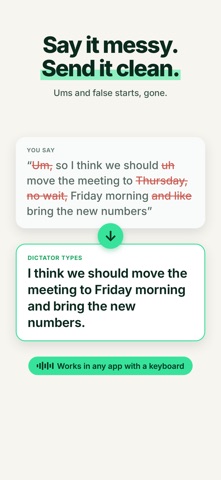
Dictator turns your voice into clean, ready-to-send text in any app: messages, email, notes, anywhere you type. Tap the mic on the Dictator keyboard, talk, and your words land where your cursor is. WHY DICTATOR - Actually clean text. Punctuation and capitals, no "um"s, lists formatted, long thoughts broken into paragraphs. Text you'd have typed, not a raw dump. - Works in any app. A full keyboard with swipe typing and emoji search, so Dictator can be your only keyboard. Plus a hold-to-talk companion for your Mac. - Private by default. What you say is never stored by us or used to train AI. On-device transcription works with no signal at all. - Respects your audio. Dictator records over whatever you're playing. It never pauses or ducks your music or car audio. MEETINGS Record a conversation or import a voice memo. Dictator writes it up: a summary, decisions, action items you can tick off, and a transcript you can search and tap to hear. Ask questions about any meeting. SAY IT YOUR WAY Pick a style and Dictator writes it that way: Super Casual, Casual, Formal, Expressive, Emoji, Jamaican Patois or Shakespeare. YOUR WORDS, SPELLED RIGHT Add names, brands and jargon to your vocabulary and Dictator spells them correctly every time. FREE AND PRO Every download starts with 7 days of Pro, no card needed. After that the free plan keeps on-device dictation, swipe typing and clean, punctuated text, plus 2,000 Pro-quality words every week. Pro adds our most accurate speech recognition and AI clean-up on every word, writing styles, the Polish key for typed text, meeting notes and full meeting transcripts. Pro is an auto-renewing subscription, monthly or yearly. Payment is charged to your Apple ID; it renews unless cancelled at least 24 hours before the end of the period, and you can manage or cancel it in your App Store account settings. HOW IT WORKS iOS keyboards can't use the microphone, so Dictator listens in its own app and keeps the mic ready in the background, so dictation starts instantly. No account required. Terms of Use (EULA): https://trydictator.com/terms.html Privacy Policy: https://trydictator.com/privacy-policy.html
What's new · 1.1.1
• Meetings: record or import a meeting, get a transcript, notes, action items, and ask questions about it. A Live Activity shows the recording on your Lock Screen. • A smarter keyboard: touch areas that adapt to the word you're typing, hold the space bar to move the cursor, and hold a letter for accents. • Cleaner text: say a list and get a numbered list, codes and phone numbers typed as digits, spoken hashtags become #Tags, and stutters and mis-hearings are fixed. • A better free plan: on-device dictation with list and line formatting, plus Pro-quality words every week. • Many reliability fixes: no made-up words over silence, no lost last sentence, and the mic recovers when another app takes it.
Details