

8/4 - Your day in 8 shots
Jiseok Han · Photo & Video
Independent analytics for this App Store listing. AppTracker is not affiliated with Jiseok Han.
Chart standing · US
What changed · US
Listing changes AppTracker has observed for this app in this storefront — new versions, price moves, rating shifts, and store copy.
• Fixed a crash when opening the shooting screen. • Fixed selfies appearing sideways on some devices. • The shooting screen now shows your layout and explains the guide. • You can retry when prices fail to load.
Screenshots



About
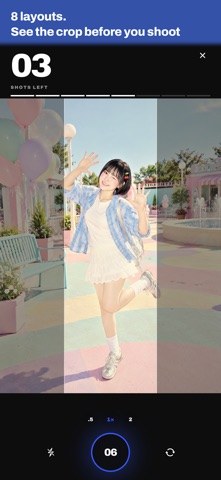
The four-cut camera where you shoot them. No booth, no self-timer. One phone, eight shots of the person you're with — or flip to the front camera for selfies. Then keep the best four as one tall 9:16 frame. ■ HOW IT WORKS 1. Pick a filter and a layout — on a big, tall live preview 2. Press the shutter yourself, eight times — no countdown, your timing 3. Pick four of the eight — the order you pick is the layout 4. Get a 9:16 frame — save it to Photos or share it Once you confirm, only the frame stays and all eight originals are deleted. Just like film, all that's left is the four you chose. If the app closes mid-roll, reopen it and you're right back where you left off. ■ 12 FILTERS · 4 free · 8 paid 6s · SE · X — the colors of 2015, 2016 and 2017 phone cameras POCKET 05 · CYBER 02 · CCD 04 — the punchy color and direct-flash look of 2000s digicams INSTANT 98 — the creamy, warm colors of instant film MOSAIC — your face stays as pixels Contrast stays gentle, and bright backgrounds don't blow out to white. Locked filters preview live, as much as you like, before you shoot. ■ 8 LAYOUTS 2×2 grid, 1×4 strip, one big + three small (top or bottom), one tall + three small (left or right), wide sandwich, and a 2×2 with a bottom band. Cells fill in the order you pick. Once you pick a layout, the parts that will be cropped out are dimmed while you shoot. Keep faces in the bright area and they won't get cut off, whichever cell they land in. ■ CAMERA · Front and back — one switch button flips between selfies and taking each other's photos, before you start or mid-roll. One roll can mix both. The app opens on the front camera the first time, then on whichever side you used last. Front shots are saved mirrored, just as you see them. · Flash — the button left of the shutter turns it on or off. When it's on, each shot waits a beat for the light: the flashlight on the back camera, a full-brightness white screen on the front. It's off by default and remembers your choice. · Zoom — on the back camera, buttons for your device's lenses (like .5×, 1× and 2×), pinch, and a dial, up to 5×. The front camera has no zoom and frames selfies like the built-in camera app. ■ FILM RULES · 1 roll = 8 shots + pick 4 + 1 frame · You start with one free roll. Finish a roll (pick four and make the frame), and the next free roll opens 24 hours later. That's true for purchased rolls too. · A roll starts with your first shot. Leave after one or more shots and that film counts as used. If it was free film, the 24 hours start when you leave. (Leave before your first shot and you keep the film.) · Finished frames stack up on Home — save or share them again anytime. ■ IN-APP PURCHASES · One roll of film (consumable) — one more roll right now, no waiting. Purchased rolls never expire, and a free roll is used first when you have one. · 8 paid filters (sold separately, buy once, keep forever) · Remove watermark (buy once, keep forever) — the small 8/4 mark in the bottom-right corner of saved and shared images goes away, on frames you've already made, too. Filters and watermark removal come back with Restore Purchases, even after you reinstall the app or switch devices. Film is consumable, so it can't be restored. ■ NO SERVER, NO ACCOUNT Photos and frames are stored only on this device, and saving or sharing happens only when you tap it. We never receive your photos or personal data. You can open any frame from Home and delete it for good. Taking someone else's photo? Ask them first. ■ PERMISSIONS · Required — Camera: to shoot your four-cut photos · Optional — Photos (add only): to save a finished frame to Photos Shooting and sharing work without the Photos permission. You can change both anytime in Settings > Apps > 8slash4. ■ SUPPORT & PRIVACY Contact sozohoy@gmail.com Privacy Policy and App Support https://bow-frog-cb1.notion.site/8slash4-Support-3e93305ae1cd80e386acccb0b9156e85
What's new · 1.1.0
• Fixed a crash when opening the shooting screen. • Fixed selfies appearing sideways on some devices. • The shooting screen now shows your layout and explains the guide. • You can retry when prices fail to load.
Details