

Cowboy for Herdr
Carl Erik Stromberg · Developer Tools
Independent analytics for this App Store listing. AppTracker is not affiliated with Carl Erik Stromberg.
Chart standing · US
What changed · US
Listing changes AppTracker has observed for this app in this storefront — new versions, price moves, rating shifts, and store copy.
• See your agents by workspace. A new Priority / Workspace switch on the home screen groups agents under the workspace they run in, with the most urgent one first. Cowboy remembers which view you picked. • Less clutter once you're set up. After your own machine connects, the demo host removes itself from your host list.
In-app purchases · US
What this app sells inside itself, grouped by kind and priced for this storefront.
Screenshots


Similar apps
Competitors and close alternatives, as estimated by AppTracker.
 herdrup: agents in your pocket
Jerry Fanelli
herdrup: agents in your pocket
Jerry Fanelli
 HerdrChat
AHMET MERT COBANOGLU
HerdrChat
AHMET MERT COBANOGLU
 Herdy - Your herdr companion
WEM Creative Studio, S.A. de C.V.
Herdy - Your herdr companion
WEM Creative Studio, S.A. de C.V.
 Heeler for herdr
野 张
Heeler for herdr
野 张
 Drover: Steer AI Coding Agents
KEISUKE NISHITANI
Drover: Steer AI Coding Agents
KEISUKE NISHITANI
 Moshpit: Terminal for Agents
文隆 胡
Moshpit: Terminal for Agents
文隆 胡
 AgentsRoom: Dev Remote Control
CHAUVIN Jean-Baptiste Thibault
AgentsRoom: Dev Remote Control
CHAUVIN Jean-Baptiste Thibault
 Happier - Remote Claude, Codex
Leeroy Brun
Happier - Remote Claude, Codex
Leeroy Brun
About
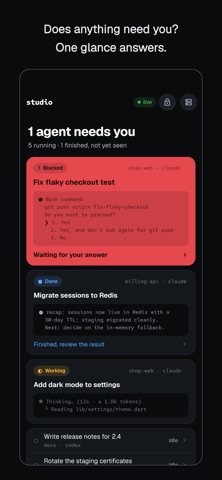
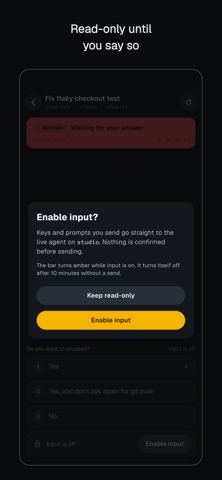
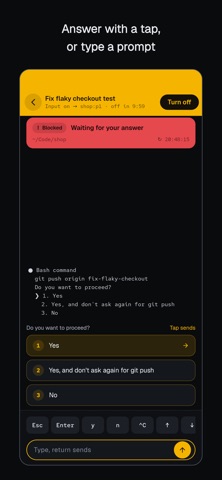
Cowboy is the phone companion for Herdr, the terminal workspace manager for AI coding agents. It answers one question at a glance: does any agent need me? WHAT YOU SEE Every agent running in Herdr on your machine, ranked by what matters. Blocked agents waiting for an answer come first, in red you cannot miss. Finished turns you have not looked at come next. Working and idle agents stay calm below. Each card shows the agent's title, its workspace, the last lines of its terminal output and a plain-language line: "Waiting for your answer", "Finished, review the result", "Working, nothing needed". Open an agent for its full output, and when it is asking a question, its options are laid out as buttons. READ-ONLY BY DEFAULT Cowboy never types into an agent by accident. Input is off until you switch it on, the bar turns amber while it is on, and it switches itself off after ten minutes without a send. When it is on, quick keys (Esc, Enter, y, n, Ctrl-C, arrows) and a prompt field go straight to the live agent. YOUR MACHINE, YOUR NETWORK Cowboy connects over SSH to the machine where Herdr runs, and talks to Herdr's local socket from there. Over Tailscale SSH no key is needed at all. There are no accounts and no servers in between: nothing leaves your own connection. Private keys, if you use them, stay in the phone's keychain. WHAT YOU NEED Herdr (herdr.dev) running on a computer you can reach over SSH, for example your laptop or a development server. Cowboy does not run agents itself; it watches and drives the ones Herdr already manages. Works with the agents Herdr supports, including Claude Code and Codex.
What's new · 1.6.0
• See your agents by workspace. A new Priority / Workspace switch on the home screen groups agents under the workspace they run in, with the most urgent one first. Cowboy remembers which view you picked. • Less clutter once you're set up. After your own machine connects, the demo host removes itself from your host list.
Details