

Photos to PDF - JPG Converter
Nero AG · Productivity
Independent analytics for this App Store listing. AppTracker is not affiliated with Nero AG.
Chart standing · US
What changed · US
Listing changes AppTracker has observed for this app in this storefront — new versions, price moves, rating shifts, and store copy.
• On your Home Screen, the app is now called Photos to PDF — your files and features stay the same. • Animations now pause when they’re out of view, so the app uses less battery.
Screenshots




About
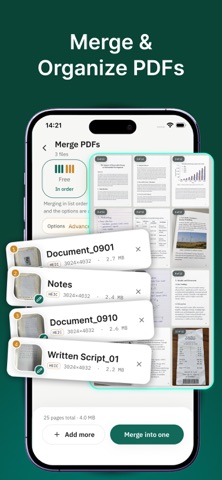
Convert unlimited photos to PDF with on-device processing. Scan paper documents, combine existing PDFs, and create smaller files for sharing—all in one app. PHOTOS TO PDF IN 3 SIMPLE STEPS Select your photos, arrange them in order, and convert. Combine images without a photo-count limit. Conversion happens on your device, without uploading your photos. SCAN DOCUMENTS WITH YOUR CAMERA Easily turn paper documents, contracts, receipts, and ID cards into clean PDFs using your phone’s camera. Crop out the background, straighten the orientation, and apply the Scan effect for a sharp, black-and-white document look. MERGE & ORGANIZE PDFs Bring separate PDFs together with more control over every page. • Merge complete files in your chosen order. • Alternate pages from different documents. • Arrange individual pages in a custom sequence. • Add continuous page numbers and dividers to keep the result organized. COMPRESS PDFs FOR EASY SHARING Create smaller PDFs for easier sending and storage. Choose a compression level and check the estimated size before converting your photos. SAVE & SHARE PDFs Save your PDFs and share them directly from the app. Access your saved documents anytime to preview or share them again. Questions or feedback? Contact us at feedback@nero.com. SUBSCRIPTION INFORMATION • An annual auto-renewing subscription is available. • Payment is charged to your Apple Account at confirmation of purchase. • Your subscription automatically renews unless canceled at least 24 hours before the end of the current period. • Your account is charged for renewal within 24 hours before the end of the current period. • Manage or cancel your subscription in your Apple Account settings. Terms of Use: https://www.nero.com/eng/corp-legal/terms-conditions.php?vlang=en Privacy Policy: https://www.nero.com/eng/corp-legal/privacy.php?vlang=en
What's new · 1.0.3
• On your Home Screen, the app is now called Photos to PDF — your files and features stay the same. • Animations now pause when they’re out of view, so the app uses less battery.
Details