

ADHD Days: Plans + Reminders
LEON NELIO FIGUEIRA · Productivity
Independent analytics for this App Store listing. AppTracker is not affiliated with LEON NELIO FIGUEIRA.
Chart standing · US
What changed · US
Listing changes AppTracker has observed for this app in this storefront — new versions, price moves, rating shifts, and store copy.
Navigation now adapts to the iPhone Duo’s side bar. Whole day and Focus now show as a single view whenever their activities match.
In-app purchases · US
What this app sells inside itself, grouped by kind and priced for this storefront.
Screenshots

About
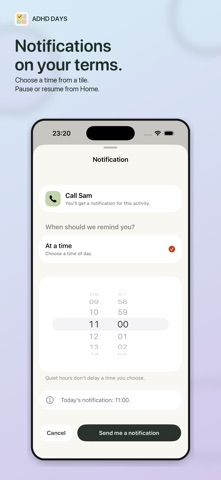
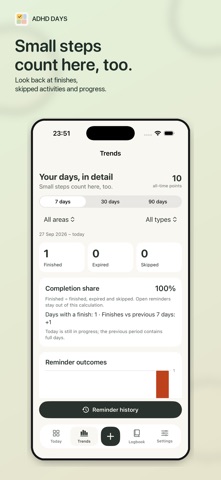
Planning apps are easy to set up and easy to forget. ADHD Days gives you a visual, flexible board for the day you actually have. Built around ADHD needs and useful for anyone who wants a calmer way to plan, it keeps routines, reminders, progress goals and private life logs together without turning every task into a strict appointment. SEE WHAT MATTERS NOW • Put your whole day into clear, colourful tiles. • Let important reminders grow as they become more relevant. • Use Focus when you only want the next few steps. • Move something to tomorrow without treating it as a failure. • Let an optional reminder window expire without deleting its history. • Keep distant plans in Future until they matter. ROUTINES THAT FIT REAL LIFE Start a flexible routine from the time you actually woke up, whether that was 7am or 2pm. Use clock routines when exact timing matters. Arrange activities in your own order and choose a target time, a flexible window, or no time pressure at all. Tap the bell on any activity to get a notification for it, with Done and Later right on the notification. Duplicate a routine to make a weekend version, or start from a ready-made one. Make repeated activities practical. Water, pet care, laundry and brushing your teeth morning and night can become editable stages inside one tile instead of filling the board with duplicates. PROGRESS BEFORE “DONE” Turn a long job into visible progress. Record one cabinet painted, one study session, or any amount you choose without pretending the whole project is finished. Hold briefly to complete a reminder, then watch it dissolve into sparkles. Undo is there when you need it. ON YOUR WRIST With Pro, the Apple Watch app shows your next small thing. Finish it, move it to later or skip it, and add it to your watch face. ON ALL YOUR DEVICES Turn on iCloud sync to use the same board on iPhone, iPad, Mac and Apple Vision Pro. It is kept in your own private iCloud, which only you can see. REMEMBER WHAT ALREADY HAPPENED Logbook is for records rather than future tasks. Save when you switched off the hob, where you put something, what you ate, or any moment you want to remember. Add notes, tallies, quantities, and optional photos, video, voice or location. SEE YOUR PATTERNS History keeps completed, expired and skipped reminders available. Trends shows finishes, missed windows, project progress, logs and tallies without giving you a streak to lose. MAKE IT YOURS Choose compact tiles or a list, themes, icons, colours, gradients and bold borders. Add Home Screen and Lock Screen widgets, including one large tile for the most useful reminder right now. FREE TO START. £4.99 ONCE FOR PRO. Everyday reminders, routines, History and the seven-day Trends pulse are free. Claim a one-time 21-day Pro gift to try everything. It never becomes an automatic charge. ADHD Days Pro is a permanent £4.99 purchase with no subscription. Pro unlocks expressive themes and icons, custom appearance, detailed Trends, richer Logbook media, advanced planning, personalised widgets, the Apple Watch app, unlimited goals and tallies, and custom units. PRIVATE BY DESIGN There is no ADHD Days account, advertising, third-party analytics, developer server or tracking. Your records stay on your device, and in your own private iCloud if you turn on sync. Export a full backup when you want to preserve or move them. ADHD Days is made by an independent AuDHD developer. If it helps you, there is an optional tip jar in Settings. If you have feedback or feature requests, please click Support.
What's new · 1.3.1
Navigation now adapts to the iPhone Duo’s side bar. Whole day and Focus now show as a single view whenever their activities match.
Details