

PhotoCoach: Ai pose suggestion
Halo Group Investment And Technology Development Joint Stock Company Limited · Photo & Video
Independent analytics for this App Store listing. AppTracker is not affiliated with Halo Group Investment And Technology Development Joint Stock Company Limited.
Chart standing · US
Screenshots



About
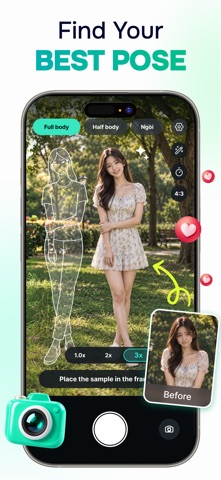
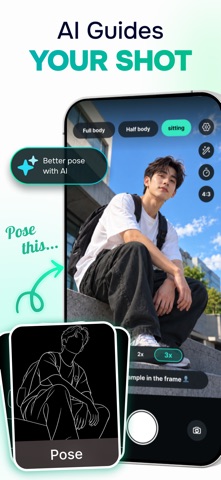
You don't need to know how to pose. PhotoCoach AI draws the pose right onto your camera screen — just step into it. A live score tells you when you've got it, and the app says exactly what to fix: raise your left arm, bend your right knee, stand a little straighter. When the frame turns green, take the shot. Turn on AI Director and the app reads the scene — a wall, a row of trees, the afternoon light — then picks a pose that fits and marks the spot with the cleanest background. After the shot, paint over strangers to erase them, then retouch with one tap using five studio-grade looks. The AI is constrained to keep your face and real skin texture — no plastic skin, no becoming someone else. POSE GUIDES ON YOUR VIEWFINDER • 41 poses in three groups: Full body, Half body, Seated — with poses for men and women • A soft "ghost" outline locks onto the person in frame: scales to their height, aligns shoulders, hips and head • Tap to switch poses, swipe to browse the set LIVE POSE COACHING • 0–100 pose-match score based on joint angles (elbows, shoulders, knees, hips) and head direction — independent of height or distance • Skeleton turns green at 80+, yellow when close, red when off • Specific spoken-style cues: "Raise your left arm a little", "Look over your left shoulder", "Lift your chin slightly" • Lighting and composition hints: underexposed, backlit, too much headroom, subject too small in frame AI DIRECTOR • Recognizes the scene (park, wall, street, indoors…) and suggests a fitting pose with a reason • Scans the background for the cleanest area and draws a floor marker where to stand — updates as you move the phone • Picks the right shot type: sees a chair or sofa, suggests a seated pose; open space, full body OBJECT REMOVAL • Paint over passers-by, litter, signs, wires — AI rebuilds the background seamlessly • Quick Erase: runs entirely on your iPhone; downloads a model once (about 200 MB), then works offline • AI Erase: sends the photo to our server for tougher backgrounds (patterns, overlapping people, text) • Pinch to zoom for detail work, Undo, Before/After compare ONE-TAP AI RETOUCH • Five looks: Natural, Bright, Film, Studio, B&W — drag one strength slider and you're done • Clears blemishes, dark spots, stray hairs; evens skin tone; brightens eyes, whitens teeth subtly • Identity preserved: no changes to face structure, body shape, clothing or background; real skin texture kept A COMPLETE CAMERA • Rule-of-thirds grid, level indicator, flash, timer, tap to focus, 1x/2x/3x zoom, front/rear switch • Manual adjustments after the shot: skin smoothing, brightness, contrast, tone, saturation, slimming • Saves straight to your Photos library PRIVATE BY DEFAULT • Pose guides, scoring, AI Director, manual edits and Quick Erase all run on your iPhone. Camera frames never leave the device. • Only AI Erase and AI Retouch use our server, and only when you choose them. Photos are downscaled and stripped of location and device data before upload, processed, then deleted — never stored, never logged. • No account, no ads, no tracking. Requires an iPhone running iOS 16 or later. AI Erase and AI Retouch need an internet connection. Privacy Policy: https://protocoachai.halogroup.tech/privacy.html Terms of Use: https://protocoachai.halogroup.tech/terms.html Support: support.aipose@halogroup.tech
Details