

Wallbum: Album Art Wall
Yu Jun Weng · Music
Independent analytics for this App Store listing. AppTracker is not affiliated with Yu Jun Weng.
Chart standing · US
What changed · US
Listing changes AppTracker has observed for this app in this storefront — new versions, price moves, rating shifts, and store copy.
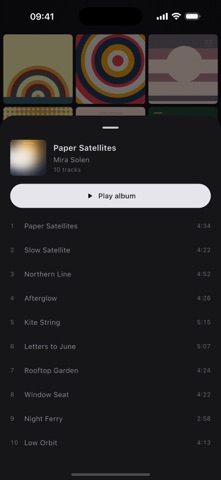
New in 1.1 • Tap for the tracks: tapping a cover now brings up its tracklist — play the whole album, or start from any track. Press and hold a cover to play the album straight away. This replaces flipping the cover. • A playlist as the source (Pro): point the wall at one of your playlists and only the albums its songs come from go up — still played whole. • iPhone Duo: unfolded, the wall spreads out into more columns, and folding, unfolding or Split View keeps you on the same album. • In Cover Flow, the album title and artist are no longer hidden behind the now-playing capsule. ABOUT PRO "Full library" is now Pro. Besides lifting the 50-album limit, it unlocks every option in Settings — source, layout, order and the playback rules. If you bought it in 1.0, you already have Pro; there is nothing to buy again. In the free version, Settings now use their defaults. Any choices you made in 1.0 are kept, not deleted, and come back the moment you unlock Pro.
Screenshots



About
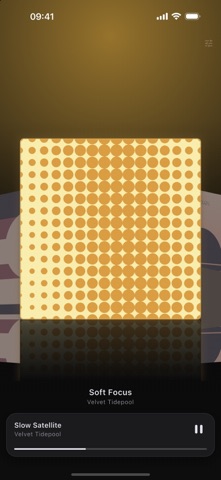
Wallbum turns your Apple Music library into a wall of album art. Tap a cover for its tracks; press and hold to play the album from its first track. A WALL, NOT A LIST Every album you have added to your library, edge to edge, covers only. No rows of text, no chrome, no tab bar. Pinch with two fingers to fit two, three or four across; it remembers what you chose. TAP FOR THE TRACKS A tap brings up the album's tracklist. Play the whole album from there, or tap any track to start from it. HOLD FOR THE WHOLE ALBUM Press and hold a cover and the album plays from track one — the way a record does. Hold the one already playing and it pauses instead of starting over. TURN IT SIDEWAYS Landscape becomes Cover Flow: the centre album enlarged, the ones beside it angled back and dimmed. Wherever you were on the wall is where it opens, and turning upright puts you back in the same place. THE ROOM CHANGES COLOUR Behind the covers, an ambient glow takes its colour from the album that is playing, and fades to the next one over about half a second. The playing cover floats, with a slow pulse around its edge. BUILT FOR 120Hz Artwork is downsampled to exactly what the screen needs and cached on the device, requested before it scrolls into view and released after it leaves. Reduce Motion is respected: the pulse and the 3D rotation give way to plain cross-fades, and nothing is lost. ONE PLAYLIST AT A TIME Point the wall at one of your playlists and only the albums its songs come from go up — still played whole, one album at a time. QUIET BY DESIGN No accounts. No sign-in. No analytics. No advertising. No third-party tracking. Nothing about your library or what you played leaves your device — there is no server of ours to send it to. FREE AND PRO Free: 50 albums on the wall, with whole-album playback, the tracklist, pinch to zoom, Cover Flow, the ambient glow and the now-playing capsule. Settings stay at their defaults. Pro: a one-time purchase that lifts the 50-album limit and opens up every setting — a playlist as the source, the portrait layout, the order, continuing to the next album, and hiding albums and skipping songs you have played. Not a subscription — nothing renews. Requires iOS 16. Streaming albums from the Apple Music catalogue needs an active Apple Music subscription; albums downloaded to the device, and files you added to your library yourself, play without one.
What's new · 1.1.0
New in 1.1 • Tap for the tracks: tapping a cover now brings up its tracklist — play the whole album, or start from any track. Press and hold a cover to play the album straight away. This replaces flipping the cover. • A playlist as the source (Pro): point the wall at one of your playlists and only the albums its songs come from go up — still played whole. • iPhone Duo: unfolded, the wall spreads out into more columns, and folding, unfolding or Split View keeps you on the same album. • In Cover Flow, the album title and artist are no longer hidden behind the now-playing capsule. ABOUT PRO "Full library" is now Pro. Besides lifting the 50-album limit, it unlocks every option in Settings — source, layout, order and the playback rules. If you bought it in 1.0, you already have Pro; there is nothing to buy again. In the free version, Settings now use their defaults. Any choices you made in 1.0 are kept, not deleted, and come back the moment you unlock Pro.
Details