

TradPad: Irish Music Sheets
Bernard O'Neill · Music
Independent analytics for this App Store listing. AppTracker is not affiliated with Bernard O'Neill.
Chart standing · US
What changed · US
Listing changes AppTracker has observed for this app in this storefront — new versions, price moves, rating shifts, and store copy.
Now at home on iPhone Duo • Fold it like a book and your library and setlists sit either side of the hinge, with nothing hiding in the middle. • Prop it like a laptop: the score fills the top half and the controls (transpose, tempo, loop, metronome, tuner) sit below, like a keyboard. • Controls and their pop-ups open on the right-hand screen, clear of the fold. • The setlist editor uses both halves too. Also in this update • Margin cropping on PDFs and photos works properly: it zooms in on the notation when you switch it on, and follows you to every page. • TradPad now works in resizable windows, with Stage Manager and Split View on iPad.
In-app purchases · US
No in-app purchases.
Screenshots


About
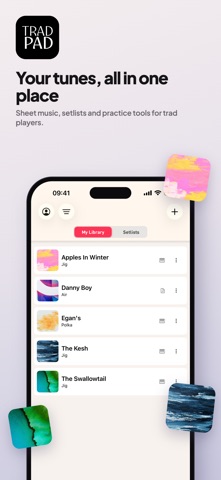
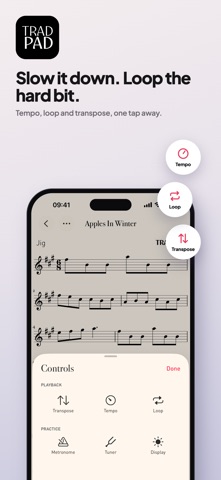
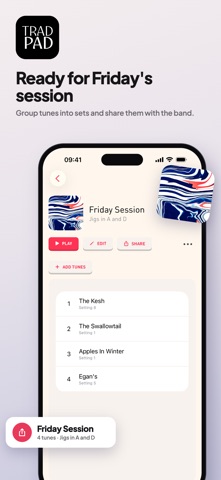
TradPad is the tunebook built for Irish and folk session musicians — one place to organize your sheet music, build your setlists, and mark up and practice your tunes right on the page. On iPhone, iPad and iPhone Duo. Whether you play fiddle, tin whistle, flute, banjo, mandolin, accordion or concertina, TradPad keeps every jig, reel, polka and waltz in your repertoire organized, marked up, and ready for the next session. WHY MUSICIANS USE TRADPAD • Your tunebook, organized — Browse your full library of traditional and folk tunes by name or tune type, with clean, distraction-free notation for every setting. • Build the perfect set — Order tunes into setlists for sessions, gigs, lessons or practice, and reorder them on the fly. • Mark it up with Apple Pencil — On iPad, add fingerings, ornaments, reminders and dynamics directly on the score, in your own hand. • Practice at your own pace — Loop tricky passages, dial in the tempo that works for you, and transpose any tune to a key that suits your instrument, without losing your place in the tune. • Practice tools built in — A metronome that follows the time signature (a jig clicks in threes), a tuner, and a recorder so you can hear yourself back against the tune. • PDFs and photos welcome — Import a PDF, scan a page or snap a photo. Pull just the pages you want out of a whole tunebook, crop away the margins, and let auto-scroll turn the pages for you. • Print it — Print any tune on A4, laid out fresh for the page, with a title and page numbers. • Your library everywhere — Sign in with a free account to keep your tunes, markings and setlists in step across your iPhone and iPad, and to read, play and print them at tradpad.app on any computer. • Made for iPhone Duo — Fold it like a book and your library sits either side of the hinge. Prop it like a laptop, with the score on top and the controls underneath. Built for the pub session, the classroom and the stage, TradPad puts your whole tunebook on your iPhone and iPad — no more loose pages, printouts or hunting through PDFs mid-session. Download TradPad and bring your tunebook wherever the music happens.
What's new · 1.5
Now at home on iPhone Duo • Fold it like a book and your library and setlists sit either side of the hinge, with nothing hiding in the middle. • Prop it like a laptop: the score fills the top half and the controls (transpose, tempo, loop, metronome, tuner) sit below, like a keyboard. • Controls and their pop-ups open on the right-hand screen, clear of the fold. • The setlist editor uses both halves too. Also in this update • Margin cropping on PDFs and photos works properly: it zooms in on the notation when you switch it on, and follows you to every page. • TradPad now works in resizable windows, with Stage Manager and Split View on iPad.
Details