

Palmote
zehao li · Utilities
Independent analytics for this App Store listing. AppTracker is not affiliated with zehao li.
Chart standing · US
What changed · US
Listing changes AppTracker has observed for this app in this storefront — new versions, price moves, rating shifts, and store copy.
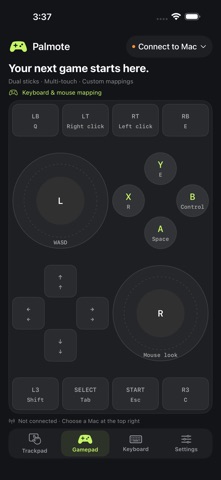
• Game controls now clearly use keyboard and mouse mapping over Bluetooth. • See the actual key or mouse button on each controller button. • Assign mouse buttons, including middle-click, to game controls. • Added a standard keyboard preset for Where Winds Meet. • Added optional precision aiming for finer right-stick mouse control. • Added a World of Warcraft Classic keyboard preset with strafing, right-stick camera control and action slots 1–0. • Mouse look and trigger bindings can now be configured independently.
Screenshots


About
Turn your iPhone or iPad into a trackpad, keyboard and customizable controller for your Mac. TRACKPAD Move the pointer, tap, scroll with two fingers and drag with a long press. Dedicated left, middle and right mouse buttons and common shortcuts stay within reach. KEYBOARD Send text and use modifier keys, arrow keys and shortcuts. Bluetooth typing uses a US keyboard layout: select the ABC input source on your Mac. Chinese, Japanese and other Unicode text are supported through the optional Mac receiver over your local network. GAME CONTROLS Use dual sticks, a directional pad, ABXY and shoulder buttons. Customize keyboard mappings, dead zone and sensitivity, and enable motion aiming on supported devices. Keyboard-and-mouse mapping works with games that accept those inputs. The controller interface sends keyboard and mouse input, including configurable mouse buttons. It does not register as a native gamepad or provide analog movement. Games continue to show keyboard and mouse prompts. TWO CONNECTION OPTIONS Bluetooth direct connection uses the Mac's built-in Bluetooth input support without a Mac receiver. Keep Palmote open in the foreground and your Mac awake. You can search for your Mac inside Palmote when the phone does not appear in macOS Bluetooth settings. Discovery and initial pairing depend on the devices and existing pairing state. Local network mode requires the Palmote Mac receiver and a six-digit pairing code. It uses an encrypted connection on your trusted local network. No account, advertising or cloud service is required. Available in English, Simplified Chinese and Japanese.
What's new · 0.1.2
• Game controls now clearly use keyboard and mouse mapping over Bluetooth. • See the actual key or mouse button on each controller button. • Assign mouse buttons, including middle-click, to game controls. • Added a standard keyboard preset for Where Winds Meet. • Added optional precision aiming for finer right-stick mouse control. • Added a World of Warcraft Classic keyboard preset with strafing, right-stick camera control and action slots 1–0. • Mouse look and trigger bindings can now be configured independently.
Details