

360° to Multi-View · Multi360
Fumihiro Kawasaki · Photo & Video
Independent analytics for this App Store listing. AppTracker is not affiliated with Fumihiro Kawasaki.
Chart standing · US
What changed · US
Listing changes AppTracker has observed for this app in this storefront — new versions, price moves, rating shifts, and store copy.
• Opens GoPro MAX / MAX 2 .360, DJI Osmo 360 .OSV and Ricoh THETA video directly (no conversion) • The free trial export is now once, 15 seconds • Fixed upside-down compass screenshots • Seam lock is off by default so every direction can be aimed • Automatic per-clip seam calibration for Insta360 footage • Keyframe camera paths: set direction and zoom over time; every pane glides smoothly in one video (Pro) • Little-planet view and auto-pan, per pane (export is Pro) • 8-pane layout; every layout can be previewed (6/8-pane export is Pro) • Export as portrait 9:16, square 1:1 or landscape 16:9 (portrait/square are Pro) • Set an export range (in / out points) • Pinch to zoom each pane • Default pane angles are now level and evenly spaced • macOS: more robust window handling at launch
In-app purchases · US
What this app sells inside itself, grouped by kind and priced for this storefront.
Screenshots



About
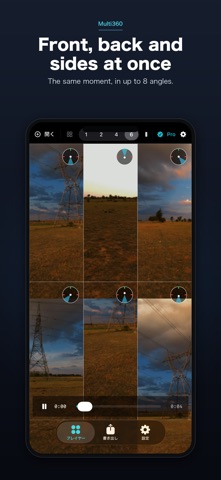
Multi360 turns ONE 360° video into several angles at the same time. Instead of reframing a single view like other 360° apps, Multi360 shows the same moment from up to eight virtual cameras side by side — and exports the whole layout as a single MP4. Recitals, family gatherings, trips, events — capture every angle from just one 360° video. ■ Features • Watch multiple angles at once: 1 / 2 / 4 / 6 / 8 panes • Drag each view to aim it freely, with a direction compass • Auto-framing: detects faces and salient regions and aims the panes for you • Composite export: combine your chosen angles into a single MP4 • Choose export quality (Standard / High / Max) • Export as portrait 9:16, square 1:1 or landscape 16:9 • Set an export range (in / out points) • Pinch to zoom each pane (40–100° field of view) • Keyframe camera paths: set direction and zoom over time and every pane glides smoothly in one video • Little-planet view and slow auto-pan, per pane • Save screenshots (with or without a compass) • Loop toggle, scrubbing, audio playback • iPhone, iPad and Mac (Universal Purchase) ■ Supported video • Insta360 .insv / .lrv (dual fisheye) — opens directly, no conversion • GoPro MAX / MAX 2 .360 — opens directly, no conversion • DJI Osmo 360 .OSV — opens directly; lens calibration is read from the file • Ricoh THETA video (.MP4) • Equirectangular 360° video (MP4 / MOV) • Direct links to 360° video (.mp4 / .mov / .m3u8) ■ Pricing Viewing is free. Try one composite export free (first 15 seconds, small logo). Unlock full-length, unlimited exports with a one-time Pro purchase — not a subscription. Works across iPhone, iPad and Mac. ■ Privacy Everything runs on your device; your videos are never uploaded. No ads. Pro exports carry no watermark or logo. Note: how each angle looks can vary by camera and shooting conditions. Multi360 is an independent app and is not affiliated with, endorsed by, or sponsored by Insta360, GoPro, DJI or Ricoh. All brand and product names are trademarks of their respective owners.
What's new · 1.0.2
• Opens GoPro MAX / MAX 2 .360, DJI Osmo 360 .OSV and Ricoh THETA video directly (no conversion) • The free trial export is now once, 15 seconds • Fixed upside-down compass screenshots • Seam lock is off by default so every direction can be aimed • Automatic per-clip seam calibration for Insta360 footage • Keyframe camera paths: set direction and zoom over time; every pane glides smoothly in one video (Pro) • Little-planet view and auto-pan, per pane (export is Pro) • 8-pane layout; every layout can be previewed (6/8-pane export is Pro) • Export as portrait 9:16, square 1:1 or landscape 16:9 (portrait/square are Pro) • Set an export range (in / out points) • Pinch to zoom each pane • Default pane angles are now level and evenly spaced • macOS: more robust window handling at launch
Details