

FolioCue
Mark Piedra · Productivity
Independent analytics for this App Store listing. AppTracker is not affiliated with Mark Piedra.
Chart standing · US
In-app purchases · US
No in-app purchases.
Screenshots


About
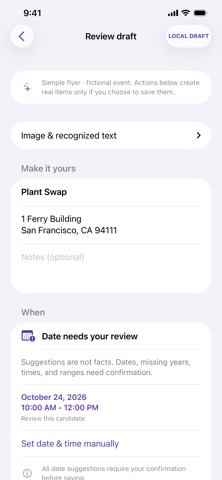
A picture. A plan. Got a flyer, screenshot, or appointment confirmation? Give the details a place to go. Choose an image or share it to FolioCue, and on-device text recognition gathers the text into an editable draft. Review the title, choose the right date and time, confirm the location, and add your own notes. Then choose what happens next: open Apple's Calendar editor, create a reminder, or look up a place in Maps. FolioCue never adds anything automatically. Ambiguous dates stay yours to decide, and every calendar schedule needs confirmation. MAKE PICTURES USEFUL • Select a photo, take a picture, or share an image from another app. • Recognize text on your iPhone with Apple Vision. • Review suggested event details and correct the source text or draft fields. • Create timed or all-day events, or reminders with an optional due date. • Search an address in Maps or open a detected website link. • Keep a local inbox and delete drafts when you're done. PRIVATE BY DESIGN Image processing and text recognition happen on your device. No account, ads, subscriptions, analytics, or cloud AI. Start with the included fictional sample flyer—no private photos needed. YOU STAY IN CONTROL Recognition and extraction can make mistakes. Always check the original image. FolioCue does not monitor your photo library or automatically detect screenshots. Shared images wait in an inbox until you open FolioCue. Calendar and Reminders items may sync through your configured accounts. Maps and websites follow their own privacy practices.
Details