

HOLD — Live Timers
Jason Fraser · Utilities
Independent analytics for this App Store listing. AppTracker is not affiliated with Jason Fraser.
Chart standing · US
What changed · US
Listing changes AppTracker has observed for this app in this storefront — new versions, price moves, rating shifts, and store copy.
HOLD IS NOW FREE TO KEEP USING. The 5-hold limit is gone. Your first 5 holds are still ad-free; after that, each new hold plays a short ad once it has started, and HOLD Pro removes the ads. WHAT CHANGED • Free holds no longer stop at 5. After your 5 ad-free holds, a short ad from Google plays after each hold starts — never before it, and never on the Lock Screen, in the Dynamic Island, in widgets or in notifications. • HOLD Pro removes every ad, and still runs up to 3 holds at once, saves your own pads and edits the 8 presets. • Using HOLD from before the free-hold limit arrived? Nothing changes for you: you never see an ad. • Ads are never personalized, and HOLD never asks to track you. • Menu has REPORT AN AD, and AD PRIVACY CHOICES where your region requires one. FIXED • Pro is recognised when you open HOLD with no signal. • Settings scrolls on smaller iPhones.
Screenshots





About
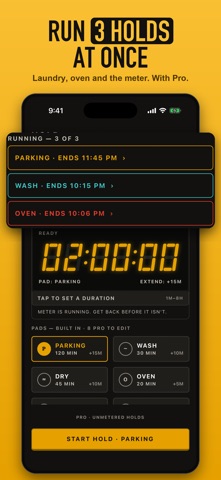
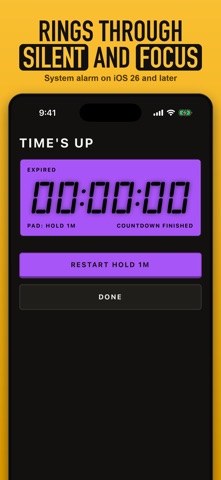
The timer you can extend from your Lock Screen. Start a hold for the parking meter, the shared dryer, the roast in the oven or the curbside pickup, then add time with one tap: no unlocking, no app, and the alert moves with it. FREE, WITH 5 AD-FREE HOLDS Your first 5 ad-free holds hold nothing back — every pad, the keypad, the Lock Screen controls, the alarm, all of it. After that HOLD stays free: each new hold plays a short ad once it has started, never before it. HOLD Pro removes the ads with one purchase, not a subscription. The counter above START shows where you stand from the first launch. ADD TIME WITHOUT UNLOCKING This is the button you actually need at a meter. While a hold is running, its Live Activity carries real controls: two extend buttons and END. Press +15 MIN on a PARKING hold and three things happen at once — the countdown moves, the completion alert is rescheduled to the new time, and the change is written down so it survives the next launch. No unlock. No app. No Face ID with a bag of groceries in your other hand. IT RINGS THROUGH SILENT On iOS 26, HOLD uses AlarmKit — the same system alarms the built-in Clock uses. Your hold sounds even if the phone is on Silent or sitting in a Focus. A timer you might not hear is not a timer. EIGHT PADS AND A KEYPAD PARKING 2h · WASH 30m · DRY 45m · OVEN 20m · PICKUP 15m · CHARGE 35m · MOVE CAR 5m · SET BREAK 20m. One tap picks a pad, one tap starts it. For the waits that are a number rather than a category, tap the big LCD readout and type any length from 1 minute to 8 hours. ON THE LOCK SCREEN AND IN THE DYNAMIC ISLAND • High-contrast LCD digits, sized to be read at arm's length in daylight. • Two extend buttons and END on the Lock Screen banner, in the pad's own amounts (PARKING: +15 and +30 MIN). • The same two, plus END HOLD, in the expanded Dynamic Island. • The compact Dynamic Island shows the pad's glyph and a live countdown; long-press to expand. • Extensions stop at 8 hours from the moment the hold began. Live Activities and their buttons need iOS 17 or later. On older iPhones the hold runs normally inside the app. COUNT DOWN TO A DATE, TOO Some waits are months long. Name a date you are counting down to — a trip, a birthday, a move — up to 10 years ahead, add reminders, and put the Event Countdown widget on your Home Screen or Lock Screen: the days left are there every time you look at your phone. Five sizes in all. HOLD counts whole days — IN 3 DAYS, TOMORROW, TODAY — so the count turns over at midnight rather than in 24-hour blocks. Widgets need iOS 17 or later. WHAT PRO ADDS • No ads, on any hold. • Run up to 3 holds at once: the laundry, the oven and the meter, each with its own Lock Screen controls and alarm. • Room for 10 date countdowns instead of 1, each with its own reminders and its own widget. • Edit the grid: your own name, length, colour, mark and Lock Screen extends on any of the 8 preset pads. Reverting one is always free. • End at a clock time. Some waits are a deadline, not a length: the meter expires at 4:30, the gate closes at 6. Type the time instead of the duration and HOLD works out the rest. • Save up to 50 of your own pads, each with its own name, length and colour. Nothing is ever taken back. Pads and events you made stay yours to see, run, edit and delete even if the entitlement lapses; only creating a new one is refused. Free runs one hold at a time; Pro runs up to 3 at once. PRIVATE WHERE IT MATTERS • No account and no sign-in. Your holds, pads, events and last 8 sessions stay in a sandboxed database on your iPhone and are never sent anywhere. • Ads on free holds come from Google and are never personalized, and HOLD never asks to track you. For Pro users the ad software never starts. HOLD is an independent countdown utility. It does not provide parking-enforcement advice and makes no medical claims.
What's new · 1.3.0
HOLD IS NOW FREE TO KEEP USING. The 5-hold limit is gone. Your first 5 holds are still ad-free; after that, each new hold plays a short ad once it has started, and HOLD Pro removes the ads. WHAT CHANGED • Free holds no longer stop at 5. After your 5 ad-free holds, a short ad from Google plays after each hold starts — never before it, and never on the Lock Screen, in the Dynamic Island, in widgets or in notifications. • HOLD Pro removes every ad, and still runs up to 3 holds at once, saves your own pads and edits the 8 presets. • Using HOLD from before the free-hold limit arrived? Nothing changes for you: you never see an ad. • Ads are never personalized, and HOLD never asks to track you. • Menu has REPORT AN AD, and AD PRIVACY CHOICES where your region requires one. FIXED • Pro is recognised when you open HOLD with no signal. • Settings scrolls on smaller iPhones.
Details