

Signature Scanner: SignLeaf
Billion Web Pte. Ltd. · Productivity
Independent analytics for this App Store listing. AppTracker is not affiliated with Billion Web Pte. Ltd.
Chart standing · US
What changed · US
Listing changes AppTracker has observed for this app in this storefront — new versions, price moves, rating shifts, and store copy.
New guided setup: draw or scan your signature and see it on a page before you start. SignLeaf now requires a subscription. Bug fixes.
In-app purchases · US
What this app sells inside itself, grouped by kind and priced for this storefront.
Screenshots




About
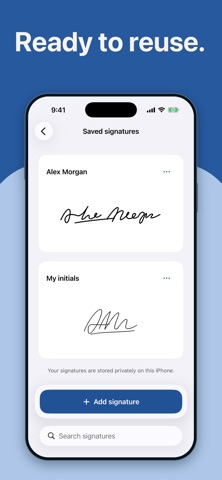
Scan your paper document, add your real handwritten signature, and save a completed copy on your iPhone. SignLeaf keeps the steps from paper to signed document in one place. CAPTURE YOUR HANDWRITING Photograph a signature or initials on plain paper, or choose an existing photo. Crop, rotate, remove the paper background, and adjust cleanup and ink strength. Zoom in to compare the result with your original. Keep signatures in your private library and reuse them on your documents. SCAN AND REVIEW YOUR PAGES Scan one or more paper pages with the iPhone camera. Review, crop, rotate, retake, reorder, or remove pages before signing. Your original scans are preserved separately from your edits. SIGN AND FILL Move and resize your signature without stretching it. Add editable text, dates, and checkmarks. Navigate and zoom through the pages, undo changes, and return to your editable draft later. SAVE, THEN SHARE Review the complete document and choose PDF, PNG, or JPG. PDFs include all signed pages; image formats create one numbered image per page. Save a completed copy inside SignLeaf, then share it or save it to Files. Cancelling sharing keeps your saved document. ON YOUR IPHONE Document and signature images are processed on-device. No account is required, and local scanning, editing, and signature storage work offline. Images, entered text, and filenames are excluded from app analytics. Local content is not synchronized between devices; keep exported copies of important files. SUBSCRIPTIONS Saving signed documents may require an auto-renewing weekly subscription. The localized price and any introductory trial for which you are eligible are shown before purchase. Subscriptions renew until cancelled through your Apple Account settings. Purchases and restores may require an internet connection. SignLeaf places an image of handwriting on scanned paper documents. It does not verify identity or provide certification or a tamper-proof signature. Privacy policy: https://arsh1219.github.io/signleaf-pages/privacy.html Terms of use: https://arsh1219.github.io/signleaf-pages/terms.html Apple standard EULA: https://www.apple.com/legal/internet-services/itunes/dev/stdeula/
What's new · 1.0.5
New guided setup: draw or scan your signature and see it on a page before you start. SignLeaf now requires a subscription. Bug fixes.
Details