

Pico: Carousel Editor
Wahlu Labs Pty Ltd · Photo & Video
Independent analytics for this App Store listing. AppTracker is not affiliated with Wahlu Labs Pty Ltd.
Chart standing · US
What changed · US
Listing changes AppTracker has observed for this app in this storefront — new versions, price moves, rating shifts, and store copy.
A smoother, more flexible editing workspace. • Refreshed text tools with font weights, spacing controls and a canvas-side size control. • Save your own text presets and bookmark fonts, styles, effects and colours. • Create custom gradients and pick colours directly from your canvas. • A dark project workspace option, with your preferred appearance elsewhere. • Smoother editing, improved layer and slide reordering, and clearer selection handles. • Switching from a continuous carousel now assigns elements by their centre, so overlapping photos are easier to find.
Screenshots



About
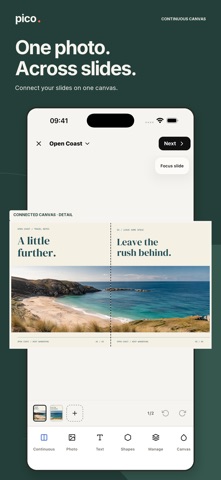
Pico is an image-first editor for creating single social images and multi-slide carousels on your iPhone or iPad. Start from a blank canvas, your own photo or an editable template. Arrange photos, text, shapes and drawings in layers, then fine-tune each element with touch controls and precise editing options. Create with: • Editable templates for posts and carousels • Photo layers, masks and on-device background removal on supported Apple devices • Text styles, bundled fonts, colours and effects • Shapes, freehand drawing, snapping and perspective controls • Independent or continuous carousel layouts • Undo, redo, locking and accessible layer management • PNG, JPEG and WebP export at your canvas dimensions Save PNG and JPEG images to Photos. Share a WebP image or save a numbered WebP carousel to Files. PNG is lossless; JPEG and WebP offer adjustable image quality. Projects are stored locally on your device. Pico does not require an account. Some features depend on device and OS capabilities. Background removal requires a supported iPhone or iPad running iOS 17 or later.
What's new · 1.1.0
A smoother, more flexible editing workspace. • Refreshed text tools with font weights, spacing controls and a canvas-side size control. • Save your own text presets and bookmark fonts, styles, effects and colours. • Create custom gradients and pick colours directly from your canvas. • A dark project workspace option, with your preferred appearance elsewhere. • Smoother editing, improved layer and slide reordering, and clearer selection handles. • Switching from a continuous carousel now assigns elements by their centre, so overlapping photos are easier to find.
Details