

Timetable‑Principal Version
shouhui qi · Utilities
Independent analytics for this App Store listing. AppTracker is not affiliated with shouhui qi.
Chart standing · US
What changed · US
Listing changes AppTracker has observed for this app in this storefront — new versions, price moves, rating shifts, and store copy.
A fresh app icon We've given the app a brand-new icon - cleaner and easier to spot on your Home Screen. Nothing else has changed: everything works exactly as before.
Screenshots

About
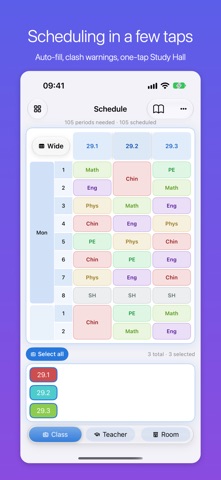
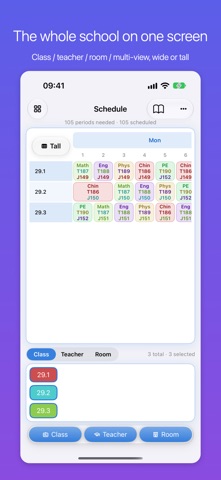
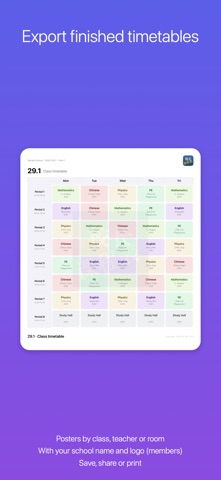
TimeTable - run your whole school's timetable in one app [Scheduling in a few taps] · Auto-fill the week from each class's weekly periods, avoiding teacher and room clashes · Tap two lessons to swap their times, or press and hold to force a lesson in (blocking lessons move out of the way) · One tap fills the empty slots with Study Hall · Review the result by class, by teacher or by room [The whole school on one screen] · Class, teacher, room and multi-dimension overviews · Wide layout for the whole week, tall layout for a single day - switch with one tap · Rows line up so one class, one teacher or one room is easy to follow · Double periods merge into a single block; lessons never merge across days [Export print-ready timetables] · Class, teacher and room posters, with your school name and logo · Save to Photos, share, or print - laid out for A4 [Enter your lists once] · Import teachers, classes, subjects, rooms and weekly periods from Excel / CSV, with templates · No spreadsheet needed: paste a table and import it · Colours are assigned automatically so the grid stays readable [Your data stays yours] · One timetable = one independent data set (its own stages, classes, teachers, rooms, subjects and lessons) · Multiple timetables: Gold 2 / Diamond 3 / Supreme unlimited · Stored only on your device, never uploaded; a built-in Data check finds broken records [Membership] · Free: 1 timetable, up to 5 teachers, 2 subjects per teacher · Gold / Diamond / Supreme: more timetables and teachers, plus finished timetable image export · All plans include a 1-month free trial; subscriptions renew automatically 24 hours before the period ends and can be cancelled anytime in Settings > Apple ID > Subscriptions [Who it is for] Head teachers, timetabling and school office staff, and training centres that would rather not buy expensive scheduling software - or fight with spreadsheets. Scheduling, without the busywork. Terms of Use (EULA):https://www.apple.com/legal/internet-services/itunes/dev/stdeula/ Privacy Policy:https://www.iphonesir.com/privacy.php
What's new · 2.1.0
A fresh app icon We've given the app a brand-new icon - cleaner and easier to spot on your Home Screen. Nothing else has changed: everything works exactly as before.
Details